Why Some Sites Load in a Blink: HTTP Caching Explained Simply
When your browser or a server keeps a copy of a page or image and reuses it instead of fetching it again, that's caching. Here's how it works and why it matters—in simple terms.
Published on

You have probably noticed that some websites load almost instantly when you visit them again, while others feel just as slow the second or third time. One of the main reasons is caching. In everyday terms, a cache is simply a saved copy of something—a web page, an image, a stylesheet—that your browser or a server keeps so it does not have to go and fetch the same thing from scratch every time. This guide explains how that works in plain language, with no technical background required.
Understanding caching helps you see why some sites feel snappy, why "clear your cache" sometimes fixes odd behavior, and how the web is designed to save time and reduce unnecessary work for everyone.
What Happens Without Caching?
Imagine you ask a friend for a recipe every time you want to cook the same dish. You call them, they read it to you, you hang up. Tomorrow you want the same recipe again—you call again, they read it again. That is a lot of back-and-forth for information that has not changed.
On the web, something similar happens when there is no cache. Your browser sends a request to the server that hosts the website ("please give me this page"). The server sends back the page—the text, images, and other files. Every time you open that page (or refresh it), the browser asks again and the server sends again. That takes time and uses the network. For popular sites with millions of visitors, doing that for every single visit would be wasteful and slow.
What Is a Cache?
A cache is just a place where a copy of something is stored so it can be reused. On the web, that "something" might be a full page, an image, a font, or a chunk of data. The copy is kept for a while so that the next time someone asks for it, the answer can come from the cache instead of going all the way back to the original server.
Caches can live in a few places. Your browser cache is storage on your own device—your computer or phone keeps copies of pages and images you have already seen. A CDN (content delivery network) is a system of servers spread around the world that hold copies of a site's files; when you request a page, you might get it from a server near you instead of from the site's main server. The site's own server can also cache things—for example, a page that is the same for many users might be computed once and then served from memory. In all cases, the idea is the same: keep a copy, reuse it when possible, and avoid doing the same work or sending the same data over and over.
Security note
Caches are not one-size-fits-all. A private cache lives only in your browser and is intended for personal data (e.g. your account page). A public cache lives on a CDN or shared proxy and is for non-personal, shared content. Misconfiguring these—for example, marking a response that contains private data as cacheable by a public cache—is a common and severe security vulnerability that can lead to data leaks. Always ensure private data is marked for private (browser-only) caching or not cached at all.
Cache Hit vs. Cache Miss
When your browser (or a CDN) looks for a page or file, one of two things happens. If a valid copy is already in the cache—one that has not expired and is still considered good to use—the response is served from that copy. That is called a cache hit. No need to bother the origin server; the answer is right there. That is when things feel fast.
If there is no copy in the cache, or the copy has expired or is no longer valid, the request goes to the origin server. The server sends back the full response, and that response may then be stored in the cache for next time. That is called a cache miss. The first time you visit a site, or the first time you ask for a resource that is not cached, you usually get a miss. Once it is cached, later requests can be hits.
How Long Can Something Be Cached?
If caches kept every copy forever, you might see an old version of a page long after the site had updated it. So caches need rules: how long is this copy good for? Those rules are communicated using cache instructions (in technical terms, HTTP headers such as Cache-Control). The server that sends the page or image can say, in effect, "you can reuse this copy for the next hour," or "for a day," or "do not cache this at all." Modern headers also support revalidation: for example, stale-while-revalidate lets a site stay fast by serving a cached copy immediately while simultaneously updating it in the background for the next visit—so you get speed and freshness without waiting.
Static content that rarely changes—like a logo image or a stylesheet—might be cached for a long time (days or weeks). A page that shows live prices or your bank balance might be set to not be cached, or to expire very quickly, so you always get fresh data. When someone says "clear your cache," they are asking you to delete those saved copies so the next time you load a page, your browser will fetch it again from the server. That can fix problems when a site has changed but your browser is still showing an old cached version.
The Invalidation Problem
Expiration is only half the battle. In modern web development, teams use cache busting—attaching a unique version hash to filenames (e.g. style.a1b2c3d4.css). When you push an update, the new file has a new name, so the old cache entry is instantly obsolete without the user needing to manually "clear" anything. The browser and CDNs treat the new filename as a new resource and fetch it, while the old cached copy simply stops being used. That way you get long cache times for performance and still ship updates reliably.
What Chrome and Edge Show in Developer Tools
You do not have to guess whether the browser reused a copy. In Chrome or Microsoft Edge, open Developer Tools (F12, or right-click the page and choose Inspect), then open the Network tab and reload the page. Each file is a row. Look at two columns: Status and Size. Other browsers show the same idea with different wording. The labels below are the ones Chromium uses.
If the Network tab has Disable cache checked, the browser will skip its saved copies while Developer Tools stay open. Uncheck that box when you want to see caching. A hard refresh (reload while holding Shift) also asks for a fresh download and is not a fair test of a normal revisit. The screenshot below is one Network tab from a reload, with Disable cache left unchecked.
Chrome Network Tab: 304 and Memory Cache
Swipe horizontally or scroll to the right to view the full screenshot.
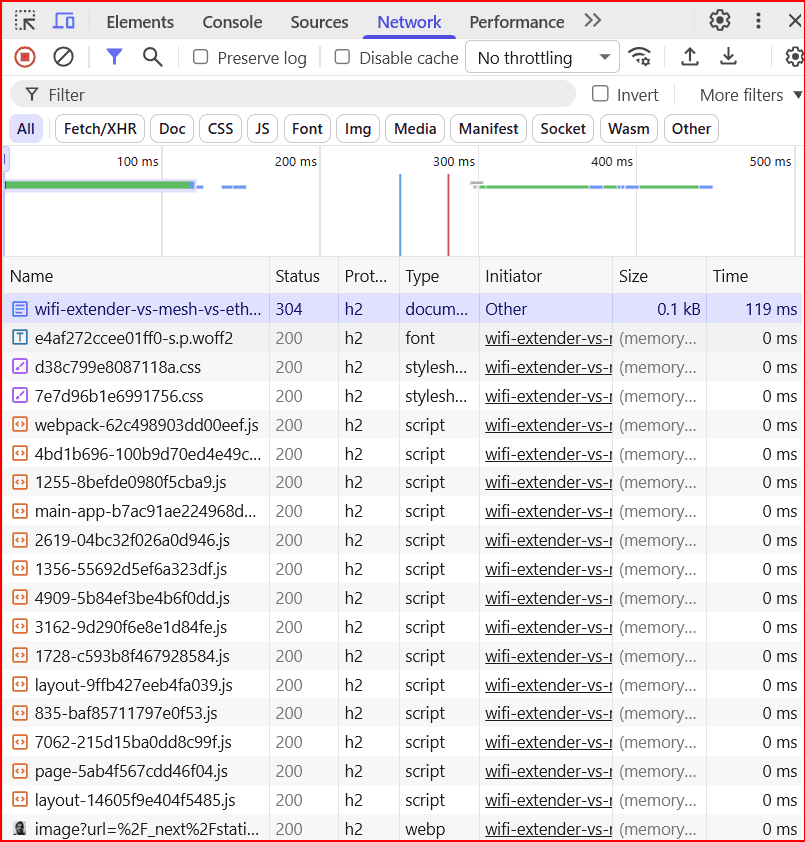
(from memory cache) in the Size column means the file came from RAM on this device. No request went out to the site. Status is usually still 200, which can look like a full download until you read Size. Memory cache is the fastest of these three. It is for copies the browser is already holding in memory for this session, and it does not survive closing the browser the way disk cache can.
(from disk cache) also means the browser reused a saved copy and did not download the file body again. The copy lived on disk, so it can still be there after you quit and come back—until the browser throws it out or the cache rules say it is no longer good. Status is again often 200. This is still a cache hit. It is usually a little slower than memory cache and much faster than fetching the whole file from the network.
304 Not Modified is different. The browser did talk to the server, but only to ask whether the saved copy is still current (using validators such as ETag or Last-Modified). The server answered that nothing changed, so the browser keeps using its saved body. Size will show a small transfer for those headers, not (from disk cache). You still used the network for a short round trip, and you did not pay for a full second copy of the file. That is revalidation, not a silent cache hit.
A Status of 200 with a real byte size in the Size column, and no "from … cache" note, is a download from the network—a cache miss, or a file the server said not to reuse. You may also see (from ServiceWorker); that is a script on the site serving the file, which is another kind of saved copy, not the same as memory cache or disk cache.
| What you see | Did the browser ask the server? | Plain-language meaning |
|---|---|---|
| (from memory cache) | No | Copy came from RAM. Fastest. Often gone after you close the browser. |
| (from disk cache) | No | Copy came from disk. Still a cache hit. Can last after you quit, until the browser drops it. |
| 304 Not Modified | Yes, a short “is this still good?” request | Server said the saved body is still valid. Headers traveled; the file body did not. |
| 200 with a byte size, no cache note | Yes, a full response | The file was downloaded. Treat this as a miss, or as a file that was not reused. |
Why It Matters
Caching makes the web faster and lighter for everyone. When a page or image is served from a cache—whether on your device or on a CDN—fewer requests reach the origin server, and less data has to travel over the network. For site owners, that can also mean less data "leaving" their server (often called egress), which can matter for performance and cost. If you run or build websites and want to dig into how much data your project sends out and how that might affect your bill, our guide to cloud egress and the Cloud Egress Cost calculator can help you model that. For most readers, the main takeaway is simpler: caching is the reason many sites load in a blink when you come back to them—and why "clear your cache" sometimes gives you a fresh start.
| Directive family | Typical intent | Browser / cache behavior (plain-language sketch) |
|---|---|---|
| Freshness (e.g., max-age, s-maxage) | Reuse this response without asking the origin until the clock runs out. | Serves the local copy immediately while valid; after expiry, must revalidate or refetch. |
| private vs. no-store | Two different rules for sensitive responses. private means the browser may keep a copy; shared caches (CDNs, proxies) must not. no-store means no layer should keep a copy at all. | With private, a later visit can still come from the browser cache. With no-store, the browser, CDN, and other caches are told not to store the response—so each load is closer to live. |
| Revalidation (no-cache, ETag / Last-Modified) | no-cache means a stored copy must be checked with the origin before reuse. That check usually uses ETag or Last-Modified. | If nothing changed, the server can return a tiny 304 Not Modified and the cache keeps the saved body—saves bandwidth without serving a stale copy blindly. |
| stale-while-revalidate | Show an older copy now, refresh quietly for next time. | User sees speed immediately; cache fetches a fresher version in the background when allowed. |
| max-age=31536000, immutable | Fingerprinted filenames mean a new deploy is a new URL. One year of freshness, and the browser is told the file will not change during that time. | Browser happily caches for months; updates ship by changing the file name, not by purging caches. |
Key Takeaways: HTTP Caching in Plain Language
A cache is a strategic copy. It optimizes the data-transfer path by keeping reusable assets closer to the user so they can be reused instead of fetched again from scratch.
Cache hit vs. miss: A hit means the copy was in the cache and could be used—usually fast. A miss means the request had to go to the origin server; the response may then be cached for next time.
Caches can live in your browser, on a CDN, at a proxy/load balancer, or on the origin server. In all cases, the goal is to avoid repeating the same work and sending the same data over and over.
Fingerprinting: Reliable caching depends on unique versioning. Hashing filenames (e.g. asset.abc123.js) ensures that users always receive the latest assets without "stale" cache errors when you deploy an update.
Cache instructions (e.g. Cache-Control, stale-while-revalidate) tell the cache how long a copy is valid and when to revalidate. "Clear your cache" means deleting those copies so the next load fetches fresh data from the server.
In Chrome or Edge, read Status and Size together. (from memory cache) or (from disk cache) means the file body was not downloaded again. 304 Not Modified means the browser asked the server whether the saved copy is still good, then reused that copy.