Local Server 101: Running a Site Without the Internet
How running a website or app on your computer works, why it doesn't need the internet, and what addresses like 127.0.0.1 and 10.5.0.2 mean.
Published on

A local server is a website or app that runs on your own computer instead of on the internet. When you open it in your browser, the request never leaves your machine—and often you don't need Wi-Fi or an internet connection at all. This guide walks through what a server is, what "local" means, why you might see addresses like 127.0.0.1 or 10.5.0.2, and when running something locally is useful.
What Is a "Server" in the First Place?
A server is a computer (or a program on a computer) that sends something when another program asks for it. On the web, your browser is the one asking; the server is the one that responds with a page, an image, or data. When you open a normal website, your browser sends a request over the internet to a server somewhere else in the world. That's a remote server—it lives on someone else's machine in a data center. On live sites, that server is often behind a reverse proxy or load balancer and may serve cached copies of pages—we have separate guides on both. A local server is the same idea, but the program that responds is running on your own laptop or desktop.
What Makes It "Local"?
Local means the server program is running on your own device—your laptop or desktop. Only you (and, if you choose, other devices on your home or office network) can reach it. When you type an address like localhost or 127.0.0.1 in your browser, you're telling the computer to talk to itself. No request goes out to the internet; the conversation stays on your machine.
Why a Local Server Doesn't Need Wi-Fi or the Internet
The browser and the server are both on the same computer. When you open http://localhost:3000, your browser sends a request to a program that is also running on that computer. The computer is built to handle that kind of traffic internally—it sends the request to itself and sends the response back. That path is called loopback: the data loops back inside the machine instead of going out over a cable or Wi-Fi to the internet.
You might still need the internet once: to download the server software or your project files. After that, running the server and opening the site in your browser can work with no connection. If your app itself fetches data from the internet (for example live weather), that part will need a connection—but the act of "talking" between your browser and the local server does not.
Why Run a Server on Your Own Computer?
People run local servers mainly to build or learn. Developers and students run a site or app on their machine so they can change code, refresh the page, and see the result without putting anything on the real internet. You can test things, break things, and reset without affecting real users or real data. The data can stay on your machine, so you don't have to upload it to someone else's server. And once everything is installed, you can often work offline—on a plane, in a spot with bad Wi-Fi, or when you simply want to keep things off the internet.
Different Ports Mean Different Origins (and Why CORS Happens Locally)
When you run multiple local servers at once—such as a frontend app on port 3000 and a backend API on port 8000—you might encounter a browser error when the frontend tries to fetch data from the backend.
Browsers enforce the Same-Origin Policy. An "origin" is defined not just by the hostname (localhost), but by the combination of protocol, hostname, and port. Because http://localhost:3000 and http://localhost:8000 have different ports, the browser treats them as completely separate websites.
Even though both servers are running on your own laptop, your browser blocks requests between them unless the backend explicitly sends CORS headers granting permission. Solving this locally usually requires configuring proxy settings in your dev server or adding CORS headers to your backend application code.
When You Might Run Into a Local Server
If you follow a coding tutorial that says "run npm run dev" or "open http://localhost:3000," you're starting a local server. Many projects use npm run dev for the development server; others use npm start or a different command—check the project's instructions. Some website builders and static-site tools preview your site by running a small server on your computer. And if you run a media server or file server at home, that's also a server that lives on your own hardware instead of in the cloud.
"Localhost" and "127.0.0.1" in One Sentence
Localhost is a name that means "this computer." 127.0.0.1 is the numeric address that always means "this computer" on the network (the loopback range 127.0.0.0/8 is reserved for that purpose). So when you open http://localhost:3000, you're really saying: open the website that is running on this machine, on port 3000. That conversation never leaves your device. You might also see a different-looking address, such as 10.5.0.2:3000—the next section explains why.
An Example of One Dev Server Showing Localhost and a Private Network Address
Swipe horizontally or scroll to the right to view the rest of this screenshot.
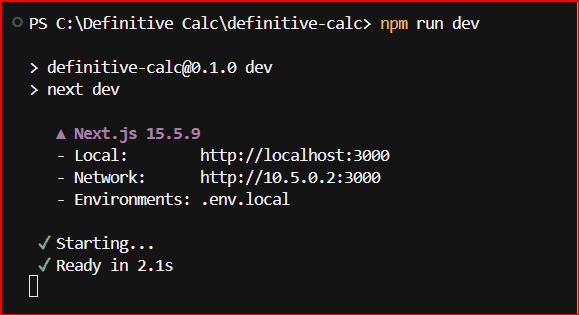
npm run dev. That command starts next dev. When the server is ready, the Local line is http://localhost:3000, which is this computer. The Network line is http://10.5.0.2:3000, a private address, not a public website. The red frame is around the screenshot. It is not part of the terminal output. This window does not show whether 10.5.0.2 is the home network, a VPN, or a container.CTO Pro-Tip: The "Port" Collision
Think of 127.0.0.1 as the building address and the port (e.g., :3000) as a specific room. You can run multiple local servers at once, but each must have its own port. If you get an "Address already in use" error, it means another program is already standing in that room.
Why Local Addresses Can Look Like "Real" IP Addresses
IP addresses are just numbers that identify a device on a network. The familiar "four numbers with dots"—like 10.5.0.2, 192.168.1.1, or 127.0.0.1—use the same format everywhere. So a local address can look like a "real" one. The difference is where that address is allowed to work: on the public internet, or only on a private or internal network.
127.0.0.1 (and localhost) means "this single machine." Traffic never leaves your device. Other ranges—like 10.x.x.x, 192.168.x.x, and 172.16.x–172.31.x—are reserved for private networks. They look like normal IPs but are not routable on the public internet. Routers on the internet will not deliver traffic to them. So an address like 10.5.0.2 is still "local" in the sense that it belongs to a private network—often your own LAN, a small virtual network, or a VPN. If you use a VPN, your device is often given an address on the VPN's private network (e.g. 10.x.x.x), so your dev server or browser might show that address instead of 127.0.0.1. Only devices on that private network can reach it.
You might also see 10.5.0.2 when your app runs inside a container (e.g. Docker or a dev-container setup). The container gets its own IP on a small virtual network; from another container or the host, the server might be at 10.5.0.2:3000. You're still working locally—just on a private virtual network rather than the single-machine loopback. So: 127.0.0.1 = this machine only; 10.5.0.2 (or any 10.x / 192.168.x address) = this device, container, or VPN segment on a private network. Both are local and don't need the public internet for that traffic.
Local vs. a "Real" (Live) Server
A local server runs on your PC. Usually only you (or others on your network) can open it. Once set up, it often works without Wi-Fi or the internet. It's ideal for building and testing. A live server—one "on the internet"—runs on a host's computer in a data center; anyone with the URL can visit it, and it needs the internet to be reachable. When you're ready to put a site online, you deploy it to that kind of server; until then, running it locally keeps everything on your machine.
Once the site is live, unit economics become the primary architectural driver. To audit your projected bandwidth and performance recapture, utilize the following frameworks: the Cloud Egress Cost Modeler and the CDN ROI & Savings Calculator.
| Idea | What it reaches | Typical everyday use |
|---|---|---|
| localhost / 127.0.0.1 | The same machine through the OS loopback interface | Opening and previewing your website in a browser on the same computer where you are building it. |
| Private LAN IP (for example 192.168.x.x) | Other devices on your home or office network | Testing how your project looks on a phone or tablet connected to your home Wi-Fi before publishing it online. |
| Loopback concept | Traffic that never leaves the device | Working completely offline—such as on an airplane or when internet service drops—because no data ever leaves your computer. |
Key Takeaways
A local server is a server program running on your own computer. Your browser talks to it on the same machine (or on a private network), so you often don't need Wi-Fi or the internet to use it.
localhost and 127.0.0.1 mean "this computer." Addresses like 10.5.0.2 or 192.168.x.x are private—they look like "real" IPs but stay on a private network and don't go out to the public internet.
Why use one: to build, test, or learn without putting anything on the internet; to work offline; and to keep data on your own machine. When you run npm run dev (or npm start, depending on the project) or open http://localhost:3000, you're using a local server.