What's the Difference Between a Proxy, a Load Balancer, and a Reverse Proxy?
They're not the same thing—but one piece of software can do more than one of these jobs. Here's how they work and how they fit together.
Published on

Proxy, load balancer, and reverse proxy pop up whenever people talk about how websites and company networks are built. The terms get mixed together so much that it's hard to tell if they mean the same thing or different things. They're related, but not the same—and often one piece of software does more than one of these jobs. Below we spell out what each term means, how they differ, and where analogies like a receptionist or a checkout lane help.
What Is a Proxy?
Think of a proxy as a go-between. You don't talk to the other side directly—you send your request to the proxy, and the proxy talks to the website or server for you, then sends the answer back. Because the proxy is in the middle, it can hide who you are (the other side only sees the proxy), save copies of answers to reuse later (caching), or block or redirect traffic based on rules.
A forward proxy sits in front of you (and other people like you—e.g. everyone in an office). When you open a website, your request goes to the proxy first; the proxy then fetches the page from the internet and gives it to you. The website only sees the proxy, not your own address. Companies use this to enforce rules (block certain sites), log what's visited, or keep your identity private. A reverse proxy is the opposite: it sits in front of your servers. When someone visits your site, they talk to the reverse proxy; the proxy talks to your machines in the back. We'll get to reverse proxies in a moment—they're the ones that often do load balancing as well.
What Is a Load Balancer?
A load balancer spreads incoming traffic across several servers so no single server gets overloaded. A good analogy: a store with multiple checkout lanes. Instead of one long line, someone directs each customer to a free lane—first customer to lane 1, next to lane 2, and so on. The load balancer is that director: it takes each request and sends it to one of your backend servers. The work is shared, so you can handle more visitors and the site keeps running even if one server goes down.
So in short: a proxy is a middleman (it stands in the middle and handles the request). A load balancer is a traffic splitter (it sends requests to different servers). Different jobs—but in the real world, the same program or device often does both. When you put a reverse proxy in front of five servers and tell it to send request 1 to server A, request 2 to server B, and so on, that reverse proxy is also acting as a load balancer.
Common ways to split traffic: round-robin (take turns: A, then B, then C, then A again), least connections (send each new request to the server that currently has the fewest people connected), and health-based (don't send traffic to servers that are down or overloaded). The aim is always the same: share the work so no one machine is stuck with everything.
How Are They Related—Are They the Same Thing?
No. A proxy is "someone in the middle who handles the request." A load balancer is "something that sends traffic to several servers instead of one." Different ideas—but the same box or program can do both. When a reverse proxy sits in front of five app servers and sends each new request to a different server in turn, it's working as a reverse proxy and as a load balancer.
Tools like nginx, HAProxy, and many cloud "load balancers" are really reverse proxies that also split traffic, handle TLS (commonly referred to as SSL), and cache. So when people say "we have a load balancer in front of our app," they often mean a reverse proxy that's doing the balancing. When they say "our reverse proxy handles TLS/SSL termination and caching," that same box is usually load-balancing too. Same machine, different job names.
In networking terms, a pure load balancer often operates at Layer 4 (blindly forwarding TCP network packets at lightning speed). A reverse proxy operates at Layer 7 (looking inside HTTP requests to read URLs, cookies, and headers so it can cache or route intelligently).
What Is a Reverse Proxy?
A reverse proxy is the front desk for your servers. When someone visits your website, they don't talk to your app servers directly—they talk to the reverse proxy. The proxy then passes the request to one of your servers in the back and sends the response to the visitor. To the visitor, there's just one address; they never see how many servers you have or which one answered. That gives you one front door, a way to hide your internal setup, and one place to handle encryption using TLS (commonly referred to as SSL), caching, and—as we saw—sending traffic to the right server (load balancing).
Quick recap: forward proxy = in front of you when you're going out to the web (e.g. at work). Reverse proxy = in front of your servers when visitors come in. Many reverse proxies are built to load-balance as well, so "reverse proxy" and "load balancer" often describe the same piece of software.
Why bother? One address for your whole app. One place to handle TLS/SSL termination (the proxy decrypts traffic and talks to your servers on a private network, so your app doesn't have to manage certificates). One place to cache things like images and CSS so repeat visitors don't hit your servers every time. One place to add security (rate limits, blocking bad traffic, or acting as a Web Application Firewall / WAF). And you can add or replace servers behind the proxy without changing the URL everyone uses.
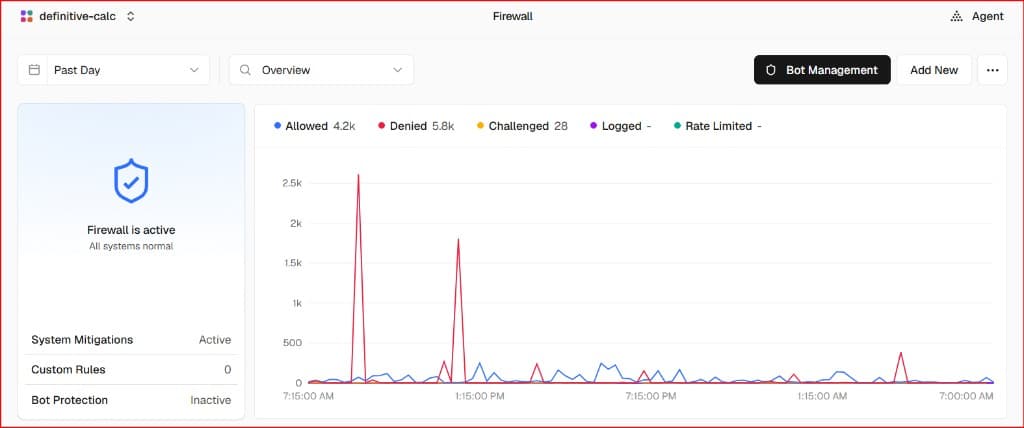
You do not have to run that front desk on a machine in a closet. Many sites sit behind a host that already acts as the reverse proxy: one public address, HTTPS, a cache for files that can be reused, and a place to slow or block abusive traffic. The screenshot below is the Firewall overview for this site's Vercel project on the free Hobby plan, set to Past Day. Denied requests outnumber Allowed in that window. Custom Rules is 0 and Bot Protection is Inactive, so those denials are System Mitigations—the platform blocking traffic in front of the app, not rules you wrote. This screen is not a forward proxy, and it is not a list of app servers.
Vercel Firewall: Past Day Overview
Swipe horizontally or scroll to the right to view the full screenshot.
The second screenshot is one request from Logs in the same project. It is a GET to a blog path on definitivecalc.com, status 200. Firewall is Allowed. Middleware also returned 200. Cache is HIT, with age 2h 20m. Vercel received it in San Francisco, USA (sfo1). That is one visit at the inbound front door. It is not a forward proxy, and sfo1 is where the host received the request—not a row of your own app servers.
Vercel Logs: One Request, Cache HIT
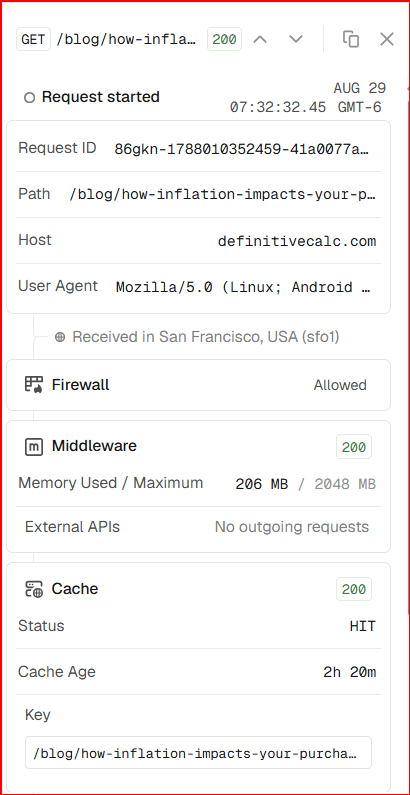
/blog/how-infla... path on definitivecalc.com, status 200, Aug 29 at 07:32:32.45 GMT-6. Request ID, full path, user agent, and cache key are cut off in this crop. Received in San Francisco, USA (sfo1). Firewall is Allowed. Middleware returned 200; memory used 206 MB of 2048 MB; no outgoing requests. Cache is HIT, age 2h 20m. This is one inbound visit at the front door. It is not a forward proxy, and sfo1 is not a list of your app servers.The Client IP Problem: Why Your App Sees the Proxy, Not the User
When a reverse proxy or load balancer sits at the front door, your app servers no longer talk to visitors on the public internet directly. The proxy accepts each request, often decrypts HTTPS using TLS (commonly referred to as SSL), then forwards it. Your app only sees that nearby connection. If it reads the address of whoever just connected, it sees the proxy's address—not the person on a laptop far away.
That matters when you want to limit how often one visitor can try something, keep a log of who did what, or guess which country a visit came from. Those jobs need the real visitor address. Reverse proxies usually add a few extra notes on the request (HTTP headers) before they send it to your app:
- X-Forwarded-For: a comma-separated list of addresses the request passed through, usually starting with the original visitor IP.
- X-Forwarded-Proto: whether the visitor connected with
httporhttps. That matters when the proxy handles TLS/SSL termination, so your app still knows the visitor used HTTPS. - X-Forwarded-Host: the public name the visitor asked for (e.g.
definitivecalc.com), even if the proxy then talks to an internal server on another port.
If you do not tell your app to use those notes, every visit can look like it came from the same proxy. Some tools call that setting trust proxy. Without it, rate limits and security logs are watching the front door, not each visitor.
One caution: anyone on the open internet can attach a fake X-Forwarded-For value. Only trust these headers when the request actually came from your own reverse proxy or load balancer.
When Would You Use Each?
Forward proxy: when many people (e.g. an office or school) should go out to the web through one exit—so you can filter sites, log use, or hide individual identities. Load balancer: when you have several servers and need to spread traffic so no one server is overloaded and the site stays up if one fails. Reverse proxy: when you want one public address for your app, one place to handle TLS/SSL termination and caching, and (usually) load balancing too. Most production sites use a reverse proxy that does all of that in one box.
Real-World Use Cases: How a Big Company Uses All Three
Picture a large company—Imagined Big Company—with lots of employees and a popular app for customers. The company uses a forward proxy, a load balancer, and a reverse proxy in different parts of its setup. Here’s how each shows up in practice.
Forward proxy: when employees go out to the web
When an Imagined Big Company employee opens a browser and visits a supplier’s website or the news, their traffic does not go straight to the internet. It goes to the company’s forward proxy first. The proxy applies the rules: it can block sites that are off-limits, log what's visited for security, and only then fetch the page. The outside website only sees the proxy's address, not the employee's. So the company has one controlled exit for outbound web use—good for security, policy, and sometimes caching so the same external page isn't fetched over and over.
Load balancer: sharing customer traffic across many servers
Imagined Big Company's app runs on dozens of servers. If every customer hit the same server, it would overload and the site would go down. So the company puts a load balancer in front of those servers. Each request—login, search, checkout—is sent to one of the servers in turn (or to the one with the fewest connections). When one server is taken out for a software update or fails, the load balancer stops sending traffic to it and the rest of the pool keeps serving. Customers never know which physical server handled their request; they just get a response. The load balancer is what makes “we have 40 app servers” feel like one reliable service.
Reverse proxy: the single front door
In Imagined Big Company's setup, the load balancer isn't a separate box—it's the same box as the reverse proxy. The reverse proxy sits in front of those 40 app servers and is the only thing that accepts traffic from the internet. Customers type https://app.imaginedbigcompany.com; their browser talks to the reverse proxy over HTTPS. The proxy handles the encrypted connection (so the app servers don't have to), then forwards the request to one of the app servers on an internal network. It can cache things like images and scripts so repeat visitors get them from the proxy instead of the servers. It can also slow down or block abusive traffic. So in one place the company gets: one public address, encrypted connections, optional caching and protection, and load balancing. That’s the reverse proxy doing several jobs at once. Architectural Note: While we call it a "single front door," putting one physical box in front of 40 servers creates a Single Point of Failure (SPOF). In reality, that reverse proxy is deployed as a highly available (HA) pair or cluster so that if one proxy crashes, another instantly takes over.
In short: employees going out use a forward proxy; customers coming in hit a reverse proxy that also load-balances across many servers. One company, two directions, all three ideas in use.
| Component | Where it sits | What IP does the server see? | Does it split traffic? |
|---|---|---|---|
| Forward proxy | Between your users (like employees) and the public internet. | Websites see the proxy's IP, not the actual laptop's address. | No—its main job is outbound filtering and security, not sharing server work. |
| Reverse proxy | Between public visitors and your backend servers. | Your servers see the proxy. To find the real visitor, your app must read the X-Forwarded-For header. | Usually yes. It acts as the single front door and spreads visitors across the servers hidden behind it. |
| Load balancer | Right in front of a group of identical servers. | Servers talk directly to the load balancer. The real visitor IP is passed along in headers. | Yes—this is its whole job. It directs visitors to open "checkout lanes" so no single server crashes. |
Key Takeaways
Proxy = a go-between. You send your request to it; it talks to the other side and brings the answer back. Forward proxy = in front of you when you go out to the web. Reverse proxy = in front of your servers when visitors come in.
The app often sees the proxy, not the visitor. Reverse proxies add headers such as X-Forwarded-For so your app can recover the real address. Only trust those headers from your own front door.
Load balancer = sends incoming traffic to several servers instead of one, like directing customers to different checkout lanes. Different job from a proxy, but the same software (e.g. a reverse proxy) often does both.
Reverse proxy = the front desk for your app. Visitors talk to it; it talks to your servers. It usually also load-balances, handles TLS/SSL termination, and caches—so "reverse proxy" and "load balancer" often mean the same box.