Stop Guessing Your Computer Is Slow—Measure the Minutes Before You Upgrade
Run the math with your best estimate first. If you're in the fair-trade-off / borderline zone, calibrate the key input—minutes lost per day waiting on this machine—before you swipe for a faster computer.
Published on

Buying a faster computer is easy to justify emotionally. The spinner appears, the export crawls, Chrome feels heavy, and suddenly a $2,000 laptop looks like self-care. The hard part is separating frustration from minutes your current machine actually steals—because those minutes are what turn a hardware receipt into a cost-per-hour-saved decision.
This article is the calibration layer for our Is a Faster Computer Worth It? Time & Cost Calculator. Use the calculator today with your best lag estimate. If the verdict lands in the fair trade-off or otherwise borderline zone, spend one week measuring how many minutes this computer blocks your workday—then re-run the math before you swipe the card.
Measurement here is not a substitute for the tool. It is how you stop feeding the tool a made-up number.
Sneak Peek: What the Calculator Uncovers for Your Setup
Swipe horizontally or scroll to the right to view the full screenshot.
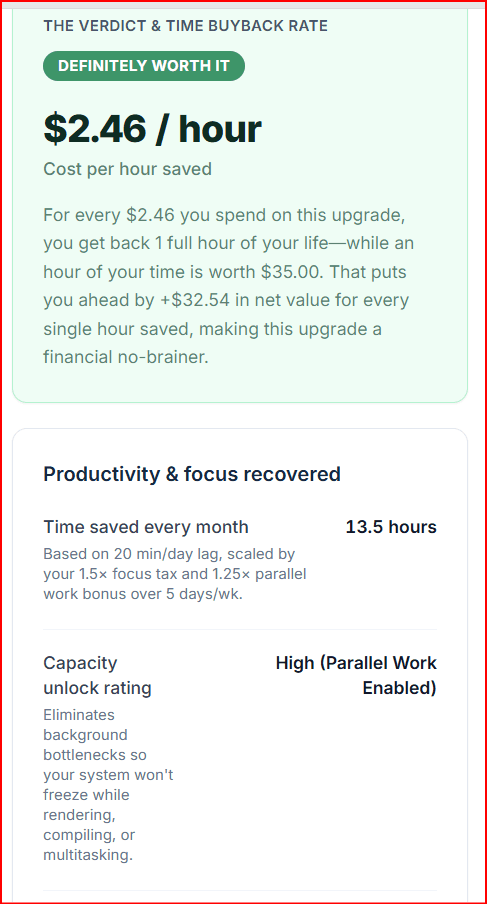
Why guessing lag quietly wrecks the upgrade decision
The upgrade calculator's engine is straightforward: net hardware cost (new price minus trade-in), divided by hours recovered over the machine's life, compared to what an hour of your time is worth. Focus tax and multitasking multipliers scale those hours, but they all start from one fragile input— minutes lost per day waiting on the computer.
Double that lag guess and you can manufacture a green “definitely worth it” badge. Cut it in half and the same $1,200 net upgrade can flip toward “not worth it.” That is not the calculator lying to you. That is sensitivity doing its job.
Frustration is not a unit of time
A ten-second freeze that derails your train of thought can feel like ten minutes of damage. Sometimes the focus tax is real—you open your phone, lose the thread, and burn another quarter hour. Sometimes you sat through a spinner calmly and the “lost” time is just the spinner. If you log the emotional story instead of the clock, you will over-buy hardware for a problem that is half attention and half machine.
Not every delay is a computer problem
Waiting on a SaaS dashboard, a flaky VPN, or hotel Wi-Fi is usually not fixed by a new CPU. Waiting on a cold boot, beachball freezes, RAM thrashing, local exports, or compile cycles often is. The measurement week exists so you stop bundling all irritation into one “my computer is slow” bucket before spending cash.
Use the calculator first—measure when the verdict is close
You do not need a research project to get an initial signal. Enter an honest-ish daily lag estimate, your hourly value, net upgrade cost, and ownership years. Read the verdict.
- Clearly worth it even with a conservative lag estimate: shopping can proceed; measurement is optional polish.
- Clearly not worth it even with a generous lag estimate: pause the full-machine purchase; consider RAM/SSD cleanup, settings, or a smaller upgrade first.
- Fair trade-off / borderline: this is when a one-week lag log earns its keep—before you convert “maybe” into a credit-card charge.
That sequence keeps calibration where it belongs: tightening the key input when the decision is close, not blocking you from running numbers on day one.
What counts as computer lag (for an upgrade decision)
For this protocol, computer lag means minutes you are blocked because this machine is loading, freezing, thrashing, rendering, compiling, swapping, or spinning—time you cannot usefully work because of the computer in front of you.
That definition is deliberately narrow. It is the slice a faster PC, more RAM, or a quicker drive can actually change. Broaden it to every annoyance in your day and you will “prove” upgrades that cannot deliver.
Count these toward daily lag minutes
Cold boot to a usable desktop. App launch until the window is actually usable. Beachball / “Not Responding” freezes. Local exports, encodes, renders, compiles, and batch jobs waiting on your hardware. Spinning-disk thrashing when opening large folders or searching local files. Periods where RAM pressure forces constant swapping.
On Windows 11, part of that login wait can be Startup apps—programs that open when you sign in. Check that list before you treat the whole wait as a hardware problem.
Do not dump these into the same bucket
Waiting on another human. Waiting on the internet or a remote SaaS server when your PC is idle and ready. Meetings. Voluntary distraction you chose while the machine was already finished. Those may be real costs in life—they are usually weak reasons to buy a new computer.
| Event | Count as computer lag? | Why it matters for upgrades |
|---|---|---|
| Cold boot / login to usable desktop | Yes | Drive, RAM, and OS load—hardware upgrade territory |
| App launch to first usable screen | Yes | Disk and memory pressure show up here daily |
| Freeze / beachball / Not Responding | Yes | Classic underpowered or thrashing signal |
| Local export, render, encode, compile | Yes | Creator and developer upgrade justification |
| Huge local folder / search spinning | Yes | Storage speed and RAM often dominate |
| Website or SaaS spinner | Usually no | Network or server—new PC often will not fix it |
| Waiting on email / coworker reply | No | Human latency, not machine latency |
| Phone spiral during a short spinner | Split it | Hard wait = lag; extra derail = focus tax, logged separately |
A one-week measurement protocol before you shop
Keep the method boring enough that you will actually finish it. Five to seven normal workdays beat one heroic “I timed everything with a stopwatch” afternoon that never repeats.
Set a tiny logging habit
Use a notes app, a paper sticky, or a simple spreadsheet with four columns: time, what stalled, hard-wait minutes, and whether you stayed ready to resume. Round to whole minutes. Do not optimize the log—optimize honesty.
Capture hard wait and focus derail separately
Hard wait is wall-clock time until the machine is ready again. That number feeds minutes lost per day in the calculator. Focus derail is whether you stayed parked on the task or context-switched (phone, inbox, random tab). Frequent derails suggest raising the focus-tax multiplier toward medium or high—not inventing extra lag minutes you did not wait.
End the week with three numbers
Average hard-wait minutes per workday. Share of stalls that caused a focus derail. Rough category split (boot / apps / freezes / heavy jobs). Those three lines tell you whether you need a whole new machine, a storage or RAM bump, or a network/software cleanup—and they give the calculator a lag input you can defend.
From measured minutes to cost-per-hour-saved
Once you have average daily hard-wait minutes, plug them into the calculator with your real new-PC price, trade-in, hourly value, workdays per week, and expected ownership years. Adjust focus tax from your derail rate. Toggle multitasking lock only if slow performance truly blocks parallel work (compile while writing docs, export while editing elsewhere).
Read the buyback rate, not just the badge color
The headline number is cost per hour saved: net hardware dollars divided by lifetime hours recovered. If that is far below your hourly value, you are buying time back at a discount. If it is near your hourly value, you are roughly break-even on money-for-time. If it is much higher, the machine is an expensive way to buy hours—unless your measured lag was understated or your ownership window is longer than you modeled.
Do not assume a new PC erases 100% of logged lag
The calculator treats recovered lag as the time you expect to stop losing. Be honest: a new machine might remove most freezes and boots, but only half your export waits if you stay on the same cloud pipeline. Prefer a conservative recovered-minutes number over a fantasy where every annoyance vanishes.
If you also care what the desk costs to keep powered while you wait, pair this time math with the Computer Power Mode Energy Savings Calculator and the companion piece on why power-mode savings look small next to monitors and overnight hours. Time tax and electricity tax are different slices of the same workspace.
False positives and false negatives in upgrade shopping
A clean log still needs interpretation. Otherwise you will either buy metal for a network problem or under-buy when rare but brutal jobs dominate your deadlines.
When a bad log still should not mean “buy a new PC”
If most “stalls” were browser tabs talking to remote apps, a clogged VPN, or a failing extension set, a faster laptop paperclips the symptom. Cleanup, browser hygiene, or network fixes beat a full machine swap. OS and settings friction can also masquerade as hardware limits—see our notes on Windows 11 upgrade total cost of ownership when the decision is OS lifecycle versus new silicon.
When a “small” average still justifies hardware
Averages hide spikes. One 90-minute render that lands twice a week can average into a modest daily number while still wrecking delivery dates. In that case, log category totals for heavy jobs separately and ask whether the upgrade shortens those jobs—not only whether the daily mean looks dramatic.
Smaller upgrades can win the cost-per-hour race
If your log is dominated by disk spin and app launches, a solid-state drive or RAM upgrade may remove most of the measured lag at a fraction of a new-PC net cost. Run that smaller net cost through the same cost-per-hour-saved logic. A $200 fix that buys back most of the minutes will beat a $2,000 chassis that buys back the same minutes.
Workload patterns: what different desks usually log
Your log categories should match how you actually use the machine. The calculator’s workload presets exist for the same reason—starting points, not destinies.
Office and web admin days
Expect more app launches, browser weight, and occasional freezes than multi-hour local renders. Measured lag is often modest. If the calculator already says “not worth it” on a fair guess, a week of logging usually confirms that a full rebuild is the wrong lever—unless freezes are constant.
Software developers
Compile, test, container, and IDE indexing waits are the ones to timestamp carefully. Multitasking lock matters when a slow machine prevents useful parallel work during those waits. Focus tax matters when a finished compile still finds you deep in chat.
Video, media, 3D, and engineering desks
Heavy jobs dominate. Log export and simulation blocks as their own category. Ownership lifespan also matters more here because the net hardware cost is higher—stretching the same recovered hours across more years drops cost per hour saved. Re-run the calculator after measurement instead of trusting the preset alone.
A practical pre-purchase checklist
Before you convert a borderline verdict into a purchase:
- Run the faster-computer worth-it calculator with a conservative lag estimate and your real net cost.
- If the badge is loudly green or loudly red, act on that signal—or challenge the lag estimate if it feels dishonest.
- If you are in fair-trade-off / borderline territory, log hardware-blocked minutes for five to seven workdays using the count / leave-out rules above.
- Re-enter measured average minutes, adjust focus tax from derail rate, and re-read cost per hour saved versus your hourly value.
- Compare a smaller upgrade (RAM/SSD) net cost against a full machine using the same recovered-minutes story.
- Browse the rest of the Computer & OS calculators if electricity cost or other desk math should sit beside the time math.
Distraction and notification noise can inflate the “I need a new PC” feeling even when hardware is fine. If your log shows short waits but long derails, also look at focus hygiene—our Windows 11 Focus and mental clarity guide covers that lever without requiring a shopping cart.
Summary
- The upgrade calculator is only as strong as its key input: minutes your current computer actually steals from the workday.
- Use the calculator today with your best estimate. Measure for a week when the verdict is a fair trade-off or otherwise close—before you swipe.
- Log hardware-blocked waits (boot, freezes, local heavy jobs). Keep network, human, and voluntary distraction waits out of that number; track focus derails separately for the focus-tax multiplier.
- Re-run cost-per-hour-saved with measured minutes, and compare a smaller upgrade against a full machine when the log points to disk or RAM—not “everything feels slow.”