AI Tokens Aren't Words — They're the Meter
How tokenization turns text into billable units, why your chat “forgets,” and how input vs. output tokens change what you pay.
Published on

When an AI chat says it hit a limit, or an API bill lists “tokens,” it is easy to picture words. That picture is wrong enough to waste money and patience.
A token is the small chunk of text (or other input) an AI model actually reads and writes. A tokenizer is the cutter that chops your sentence into those chunks. The context window is how many chunks fit in memory at once. Your bill is usually metered on those chunks—not on English “words.”
This guide is the practical map: what tokens are, why the same sentence can cost different counts, why long chats go fuzzy, and how input vs. output pricing changes the math. For a related “hidden bill” mindset in cloud networking, see cloud egress costs—different meter, same habit of measuring the unit that actually gets charged.
What a single request usually puts on the meter
Before the analogies, here is the boring-but-useful inventory. One “chat with the model” is rarely just the sentence you typed. On a typical paid API request, what you send can include:
- Standing rules — the always-on instructions the product sends (tone, safety limits, “answer in this format,” what helpers the model may use).
- Conversation history — earlier messages still included so the model can stay coherent.
- Your new message — the latest ask.
- Stuffed-in documents — pasted policies, PDF extracts, search results, spreadsheet dumps, code files.
- Helper results — when the model used a calculator, lookup, or other add-on, and the raw answer got fed back in for the next step.
What you pay for on the way out is whatever the model writes for that turn: the reply you see, and sometimes the “please call this helper next” text some products also count. If your app does a few back-and-forth steps behind one chat bubble (plan → helper → read result → answer), you may be charged for several model runs that felt like one reply.
Real-World Model Tiers & Multi-Step Reasoning Controls
Swipe horizontally or scroll to the right to view the full screenshot.
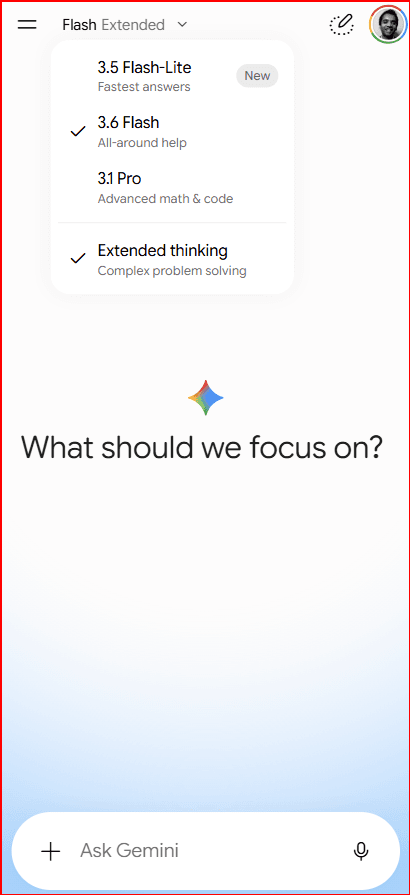
That is why two people can type the same five-word question and see very different usage: one app sends a lean prompt; another silently attaches a 20-page handbook every time.
What tokenization actually does
Models do not “read English words” the way a person skims a page. They read a stream of tiny coded pieces from a fixed menu. Tokenization is the step that turns your characters into that stream.
A useful picture: imagine a deli that never sells a whole roast as one item. It always runs meat through a slicer first. Some slices are thick (common words). Some are thin (rare endings, odd spellings, code symbols). You pay by the slice, not by “how many sandwiches” you thought you ordered.
That slicer is the tokenizer. Modern chat models usually cut text into subword pieces: common patterns stay as one slice; unusual strings get broken into smaller slices. (You may see technical names for the cutting method in docs—you do not need them to read a bill.)
So “token ≈ word” fails in everyday cases:
- Spaces and punctuation often become their own slices (or cling to neighboring text, depending on the tokenizer).
- One English word can be one token—or three.
- The same characters can tokenize differently across model families because each family ships its own slicer and catalog.
Rule of thumb you will hear—“about four characters per token in English”—is a rough average for some English-heavy workloads, not a law. Treat it like “about 5,280 feet in a mile” only after you check your own text with that model’s counter.
Why the same sentence can get different counts
Three everyday reasons counts disagree even when the letters look identical on screen:
- Different slicers. Model families ship different catalogs. Switching models mid-project can change tokens for the same prompt—sometimes a little, sometimes a lot.
- Invisible characters. Extra spaces, line breaks, “smart quotes,” leftover junk from copy-paste, and other characters you cannot see can all become slices. What looks clean in a chat box may not be clean underneath.
- Extra wrapping you never typed. Chat apps and developer kits often wrap your text in labels or formatting before it reaches the model. That wrapping usually counts too.
So when a usage screen and a rough mental estimate disagree, believe the counter tied to the model you actually use—not the word count in your draft document.
Swipe sideways if the diagram is cropped on a small screen.
The “Ġ” style marker in some tokenizers is a way of showing a leading space glued to a piece. You do not need to memorize the glyphs—just know spaces are not “free.”
The context window: one shared working memory
Think of the model’s working memory as one suitcase with a hard weight limit printed on the tag—64k tokens, 128k tokens, 200k tokens, whatever that product allows. Everything that must be “in mind” for the next reply fights for space in that same bag:
- Standing rules (“be concise,” helper rules, persona)
- Your past messages
- The model’s past replies
- Any files, search snippets, or helper results stuffed in
- Room left for the new answer
That limit is the context window. When the bag is full, something has to stay home. Chat products often drop or shrink older turns. From your seat it feels like the AI “forgot.” Under the hood, those older tokens simply are not in the suitcase anymore.
Why long threads get expensive and fuzzy
Each new message usually re-sends a growing pile of prior tokens (plus the new ones). So turn 30 is not “one short question”—it is the question plus the history still riding along. You spend tokens on repetition, and you risk early details getting dropped even though they still mattered.
Practical moves: start a fresh thread when the topic changes; paste only the facts that still matter; put lasting rules in a short pinned instruction instead of re-explaining every time.
Context window vs. reply length limit — two different dials
People often mash these together. They are related, but they are not the same knob:
- Context window = how much total stuff can be in the suitcase for one request (instructions + history + your message + room for the reply, in most setups).
- Reply length limit (sometimes labeled max output) = a separate ceiling on how long the answer is allowed to grow. You can have a huge suitcase and still set a short reply cap—or hit a reply cap long before the suitcase is full.
If a product says “stopped early” or “hit length limit,” check whether you filled the suitcase or merely hit the reply dial. The fix is different: trim history for the first problem; ask for shorter answers (or raise the reply cap on purpose) for the second.
What “forgetting” usually is—and is not
Dropped context is a space problem: the earlier tokens are gone from the bag. Separate from that, models can also mishandle facts that are still present—especially when the bag is crowded with conflicting instructions. Clearing space helps the first case. Clearer, shorter standing rules help the second. Do not treat every wrong answer as “the window was too small” without checking whether the fact was still included.
Swipe sideways if the diagram is cropped on a small screen.
How input and output get billed differently
A taxi often charges differently for waiting in traffic versus rolling to the airport. Many AI APIs rhyme with that idea: input tokens (what you send—prompt, history, files) and output tokens (what the model writes back) can have different prices per million tokens.
Exact rates change by provider and model. The useful skill is the worksheet, not memorizing today’s price board:
- Estimate (or measure) input tokens for a typical request.
- Estimate output tokens for a typical reply.
- Multiply each by that model’s input and output rates, then add.
- Multiply by how many requests you run per day.
A short question with a long essay answer can cost more than a long question with a two-sentence answer—if output is priced higher. That is why “be brief” is not just style advice; it is how you manage the meter.
Swipe sideways if the diagram is cropped on a small screen.
Tiny cost worksheet (illustrative rates)
Suppose a request uses 2,000 input tokens and 500 output tokens. Using made-up round numbers only to show the arithmetic—replace with your provider’s live rates:
| Part | Tokens | Example rate | Cost math |
|---|---|---|---|
| Input | 2,000 | $3 / 1M tokens | 2,000 ÷ 1,000,000 × $3 = $0.006 |
| Output | 500 | $15 / 1M tokens | 500 ÷ 1,000,000 × $15 = $0.0075 |
| Total (1 request) | 2,500 | — | $0.0135 |
| × 10,000 requests | — | — | ≈ $135 |
The takeaway: trimming repeated history (input) and capping rambling answers (output) both save money—especially when you run this many times a day. Same habit as watching network cache hit ratio turn into dollars: measure the unit that shows up on the invoice.
Same job, two prompts (where the waste hides)
Imagine you only need a yes/no risk flag plus one sentence of reason. Prompt A and Prompt B ask for the same decision—but they dress it differently:
| Version | What you send | What you ask for | Why the meter moves |
|---|---|---|---|
| Lean | Short rules + the 3 facts that matter | “Yes/No + one sentence.” | Small input; short answer |
| Puffy | Full handbook pasted every time + long chat history | “Write a thorough analysis with examples.” | Huge repeats in; long essay out |
At one request, the difference might be pocket change. At tens of thousands of requests a day, Prompt B is a different product budget. Fix order that usually works: cut repeats first, then tighten the ask, then shop for a different model—not the reverse.
Watching words appear live does not make them free
Some chats show the reply typing out word by word. That feels faster and friendlier. It does not make output free. You still pay for the slices that were written. Live typing is a delivery choice, not a discount.
Tokens also buy time
Longer answers usually take longer to finish. Even when price is not your pain point, a habit of 800-token answers for a 40-token need slows everyone waiting on the reply. Cost and wait time often move together—another reason to say how long the answer should be in the instructions.
Same idea, different “token” jobs
Chat tokens vs. search-index tokens
Chat tokens fuel a conversation: in goes context, out comes new text, counted on the meter.
Embedding tokens (a common name in the docs) usually turn a passage into a list of numbers used for search and “find similar” features. You still pay for tokens of text processed, but you are not buying a chat reply—you are buying a way to look things up by meaning. Mixing the two in your head causes wrong cost forecasts.
A common setup: index your knowledge base once (or when it changes), store those lookup numbers, then at question time only process the short user question and pull the closest few paragraphs into the chat. That keeps the expensive “read the whole library every time” habit out of the chat suitcase.
Not login tokens, not crypto tokens
On the web, “token” also means login tickets, API passwords, or other security passes. In crypto, “token” means a digital asset. This article’s tokens are the little text slices AI models bill you for. Same English word; different machines. If APIs in general are new to you, start with What Is an API? then come back to how AI APIs meter usage.
Swipe sideways if the diagram is cropped on a small screen.
Practical gotchas that inflate the meter
Code, JSON, and “ugly” text
Source code and structured data (like JSON) often need more slices than clean prose: lots of symbols, names, and punctuation become many small pieces. A screenful of JSON can cost more tokens than a screenful of blog copy.
If you only need three fields from a fat data dump, pull those fields out before the model sees them. Shipping the whole object “just in case” is a classic silent burn.
Other languages and scripts
Some slicers were trained more on some languages than others, so they may need more pieces to represent your text. The fair billing question is simply: “Does this slicer’s menu fit my language efficiently?” Always measure with the counter for the model you will actually use when language mix matters to cost.
Images and other media
Products that accept pictures (and sometimes audio) often turn those into their own token budget—sometimes based on size or a fixed “image allowance,” depending on the product. A photo attached “for context” can outweigh a paragraph of text on the meter. If the model only needs one detail from the image, say that detail in words when you can.
Hidden repeats
Re-pasting the same 3,000-token policy doc on every request is a silent burn. Prefer pulling in only the few paragraphs you need, or a short summary, instead of shipping the whole binder each time—similar to not re-downloading the same images on every page view on a website.
Some platforms also let you reuse a long, rarely changing instruction block more cheaply after the first time (you may see this called prompt caching or something similar). Exact rules differ by provider. The simple habit: put the long, stable rules where those systems expect to reuse them, and keep the per-request details short and toward the end.
How to read a usage spike without panicking
When a usage screen jumps, ask four questions in order:
- Did you run more requests, or did each request get fatter?
- Was the jump mostly input (history/docs) or output (long replies)?
- Did you recently change a prompt or start always attaching a big file?
- Is one user action secretly triggering many model runs behind the scenes?
Those four answers usually point to the fix faster than swapping models on day one.
A 5-step habit for builders and buyers
- Count with the real tokenizer for the model you will ship—not with a word processor’s word count.
- Budget the suitcase: instructions + must-keep facts + reply room. Know whether a failure is a full suitcase or a reply-length cap.
- Split the bill: forecast input and output separately, then multiply by how many requests you run per day.
- Attack repeats before you attack model choice— history bloat, handbook paste, and puffy “be thorough” asks.
- Re-check after prompt changes—a “clearer” prompt that doubles tokens is not clearer on the invoice.
How to avoid bill shock
Understanding tokens is half the job. The other half is putting brakes on the account so a busy weekend, a buggy loop, or a stolen password cannot quietly empty the wallet. Menus differ by company; the habits below travel well.
Cap the spend before you need it
- Set a hard monthly (or daily) budget in billing settings when the product offers one—so usage stops or slows instead of climbing forever.
- Turn off or tightly limit auto-reload while you are still learning real traffic. Automatic payments that refill credits the moment you hit zero feel convenient until a bug spends the refill overnight.
- Turn on alerts below your limit (for example at 50% and 80% of budget) so you get a warning while you can still fix the prompt—not only after the card is charged.
Keep play money separate from real money
If the provider lets you, use a separate access key (or a separate project) for weekend tinkering versus the live app. Put a low spend limit on the tinkering key. That way a messy prototype cannot burn through the same open budget as your real customers. If you shared a demo login or key with someone, shut that key off afterward—the same way you would change a password after handing someone temporary access.
Watch the bill after you change something
After you change standing rules, start always attaching a bigger file, or turn on extra helper steps, glance at usage for a day. A “clearer” prompt that triples tokens per request will not look dramatic in a single chat—it will look dramatic on the invoice. If you serve lots of users, try the change with a small group first and compare tokens per successful task before and after.
Bill shock is rarely mysterious once you have a budget, an alert, and a habit of measuring the unit this article described. The meter only helps if someone is watching when it spins too fast.
Summary: tokens are the meter
- One request often meters far more than the sentence you typed: standing rules, history, files, and helper results can ride along.
- Tokens are slicer chunks, not English words; tokenizers differ by model family, and invisible characters / extra wrapping count.
- The context window is one shared suitcase; the reply length limit is a separate ceiling—do not confuse the two.
- Many APIs price input and output differently; live typing does not make output free; longer answers also cost wait time.
- “~4 characters per token” is a rough English rule of thumb—verify with a real counter. Cut repeats before you shop models.
- Avoid bill shock with hard budgets, cautious auto-reload, early alerts, a low limit on tinkering keys, and a usage check after prompt changes.
- Do not confuse AI tokens with login/security tokens or crypto tokens; chat tokens and search-index (embedding) tokens are also different jobs.