Cross-Origin Resource Sharing (CORS): The Browser's Permission Slip Between Sites
CORS stands for Cross-Origin Resource Sharing. In plain terms: your page is on one “origin,” it asks another site for data, and the browser only lets your page read that answer if the other site says it’s allowed. Here’s the name, the rule, how to detect it, and what to do about it.
Published on

If you have ever opened a browser console and seen a red message about CORS or Cross-Origin Resource Sharing, you are not alone. The words sound like a broken server. Often the server answered fine—and your browser refused to let the page read that answer.
This guide is the permission-slip version of CORS: what the acronym means, who defines the rule, what an origin is, how to spot the error, and what actually has to change. It pairs well with what an API is (the ask/answer pattern) and local servers and localhost (where localhost:3000 vs :3001 suddenly matters).
CORS in one sentence
CORS is how browsers decide whether a page from origin A is allowed to read a response that came from origin B.
Think of two schools sharing homework answers by mail. School B can put a sealed envelope in the mail. School A's student only gets to open that envelope if School B stamped a permission slip that names School A. No slip? The mail may still arrive—but the student is not allowed to read it. In the browser, that “not allowed to read it” moment is the CORS error.
What CORS stands for (and why it is called that)
CORS expands to Cross-Origin Resource Sharing:
- Cross-Origin — the page and the data live on different “origins” (different sites, or even the same machine on different ports).
- Resource — the thing being fetched: JSON from an API, a font file, a photo, and so on.
- Sharing — permission for that page to use the resource inside its scripts.
The name is a plain label, not a company brand. It describes the job: sharing a resource across origins—when the other side allows it.
Who defines CORS—and is it a worldwide standard?
Yes. The big browsers—Chrome, Firefox, Safari, Edge, and others—all follow CORS. It is a normal part of how the web works, not a random plug-in. Groups that write web standards described the rules (historically the W3C; the day-to-day details now live in the Fetch standard from the WHATWG). You do not download CORS. Your browser already has it built in.
One important nuance: the server is not running a special “CORS app.” It just sends a few labels in its reply (especially Access-Control-Allow-Origin). The browser reads those labels and decides whether your page’s JavaScript may look at the data.
That is why the same API call can feel fine when it runs on a server, but fail when JavaScript in the browser tries it. The browser is the one enforcing the permission slip. The same split shows up in app architecture: server-rendered fetches often never hit browser CORS the way client-side JavaScript does.
Same-Origin Policy: the default lock before the permission slip
CORS sits on top of an older rule called the Same-Origin Policy (often shortened to SOP). By default, a page from one origin should not freely read private data from another origin. That default protects you: a random tab should not quietly read your bank tab’s data—including things like cookies and other browser storage that belong to another site.
CORS is the controlled unlock: “this other origin may share with that page—here is the written permission.” Without CORS, the default stays closed for reading across origins in scripts.
What is an “origin”? (scheme + host + port)
An origin is not “the company name.” It is a precise address made of three parts glued together:
- Scheme — usually
httpsorhttp - Host — the domain, like
definitivecalc.com - Port — the door number, like
443,3000, or3001
Change any one part and you have a different origin. That is why a site on http://localhost:3000 talking to http://localhost:3001 is already cross-origin—same computer, different door.
| Pair | Same origin? | Why |
|---|---|---|
| https://example.com and https://example.com/app | Yes | Same scheme, host, and default https port |
| https://example.com and http://example.com | No | Scheme differs (https vs http) |
| https://a.example.com and https://b.example.com | No | Host differs (subdomains count) |
| http://localhost:3000 and http://localhost:3001 | No | Port differs—classic local-dev trap |
The permission-slip moment: reading vs “the server answered”
A CORS failure often means the network call happened, but your page’s JavaScript is not allowed to look inside the response.
Picture a nightclub with a clipboard. Your page is a guest. The API response is a sealed tray from the kitchen. The browser is the bouncer. If Origin B did not stamp Access-Control-Allow-Origin for Origin A, the bouncer keeps the tray out of the guest’s hands— even if the kitchen already cooked the food.
That is why the Network tab can show status 200 while the Console still screams CORS. The dinner arrived; the guest is not allowed to open the lid.
DevTools Console: CORS Policy Block
Swipe horizontally or scroll to the right to view the full screenshot.
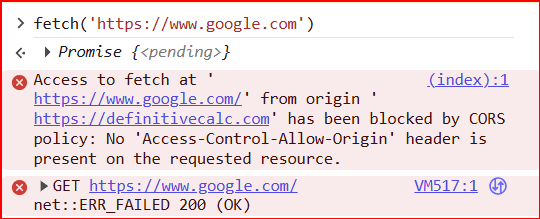
fetch('https://www.google.com') is blocked because the response lacks Access-Control-Allow-Origin. The Network line can still look odd (ERR_FAILED with a 200) while JavaScript is denied the body.How to detect a CORS problem
Console first
Open DevTools → Console. CORS messages usually name Cross-Origin Resource Sharing, blocked by CORS policy, or missing Access-Control-Allow-Origin. Read the full line: it often names both origins.
Network tab second
Open Network, trigger the action again, click the request. Check status code and response headers. Look for Access-Control-Allow-Origin. Missing or wrong value + a Console CORS error = classic case.
GET and POST in one breath
Every HTTP request carries a method—a short verb for what you want. GET means “hand me this resource” (read / look up). POST means “here is some data; please take it and do something” (submit a form, create a record, send a payload). You will also see OPTIONS in CORS land: that one is not your real app call—it is the browser’s “may I?” scout, covered next.
Watch for a preflight
Some requests show an extra call with method OPTIONS before the real GET or POST. That scout trip is a preflight: the browser asking permission before the main request. If OPTIONS fails CORS checks, the main call may never run as your script expects.
DevTools Network: Access-Control-Allow-Origin
Swipe horizontally or scroll to the right to view the full screenshot.
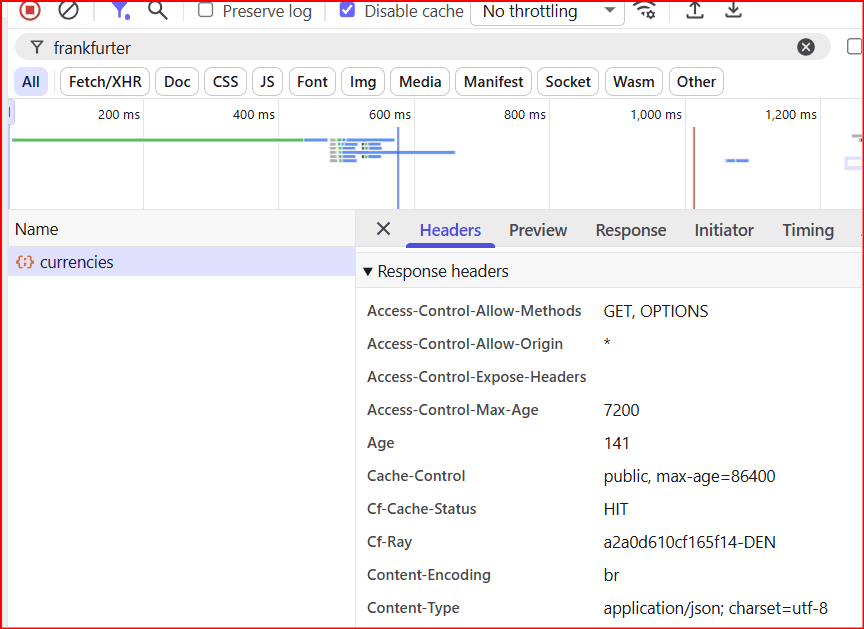
currencies call. The permission slip is right here— Access-Control-Allow-Origin: *—so the browser lets page JavaScript read the JSON. Compare that with the Console block when the header is missing.Preflight: the scout before the main trip
Some cross-origin requests are “simple” enough that the browser sends them and then checks the permission slip on the way back. Others are treated as needing a heads-up first: custom headers, certain methods, and similar cases can trigger a preflight.
Analogy: before the delivery truck rolls, a scout bikes to the gate with a clipboard—“Am I allowed to bring this kind of package?” That scout is the OPTIONS request. Only after a clear yes does the main delivery go.
Who fixes CORS—and what does not
The other origin’s server (usual fix)
Whoever runs Origin B configures response headers so the browser sees a valid permission slip for Origin A—commonly Access-Control-Allow-Origin, and related headers when credentials or special methods are involved. That is a server (or API gateway) change.
A same-origin proxy (common in local apps)
Your page only talks to your origin. Your server (or Next.js rewrite, and similar) fetches Origin B in the background. The browser never makes a cross-origin read—so CORS never enters the chat for that call. Useful in development and in some production designs. That middle hop is the same family of idea as a reverse proxy: the browser speaks to one public face; the messy upstream talk happens behind it.
What usually fails as a “fix”
- Turning off browser security for yourself is not a product fix.
- CORS is not a replacement for login, API keys, rate limits, or server-side checks.
- A 401 or 500 is a different problem than a CORS block—even if both show up in the Console.
A tiny real-world picture
You run a local UI on http://localhost:3000 and call a hosted API on https://api.example.com. Different scheme, host, and environment—classic cross-origin. If the API does not allow your local origin, the Console shows CORS. The same call may still work when your server fetches it instead. The fix is headers on the API (or a local proxy)—not yelling at the weather.
Quick checklist
- Does the Console mention CORS or Cross-Origin Resource Sharing?
- Are the page URL and the API URL really different origins (scheme/host/port)?
- In Network, is
Access-Control-Allow-Originpresent and matching? - Is there a failing OPTIONS preflight before the real method?
- Should Origin B add headers—or should Origin A use a same-origin proxy?
Summary
CORS means Cross-Origin Resource Sharing. It is the browser’s permission-slip system for when a page on one origin may read a response from another.
Browsers enforce it worldwide as part of the web platform. Servers participate by sending headers such as Access-Control-Allow-Origin. A CORS error often means “answered, but not readable,” not “API is offline.”
Detect it in the Console and Network tab (watch for OPTIONS preflights). Fix it on the API’s headers—or proxy through your own origin. For the ask/answer pattern behind APIs, see What Is an API? For why local ports create new origins, see What Is a Local Server? When the “fix” is a proxy in front of the API, proxies and load balancers is the matching map.