A Padlock in the Browser Address Bar Does Not Mean That Website Is Safe
Do not rely on the padlock in the browser address bar by itself to decide a website is safe. A website can show that padlock and be unsafe, spammy, or fake. The padlock means the connection to the named website is private, and the website name beside it shows which website is open, including a misspelling or a wrong ending. Browsers change, so the padlock may appear only after you open the security details, rather than in the address bar as soon as the page loads. If the page is crossing a network without a private connection, someone on that path can read or change it on the way. A page that never leaves your computer can show the same warning even though there is no such path.
Published on

A padlock in the browser address bar can sit on the same line as the website name, or one click in, inside the security details, which makes it easy to read as a yes on the website itself, even though what it covers is the connection between the browser and the website named in that address. Other people on the network are not supposed to read the page, or what you type, while those things are on the way. The website at the end of the connection can still read what you send, and the padlock does not review whether that website is unsafe, spammy, or fake.
That is why the padlock is not enough by itself when the question is whether the website is safe. The website name beside the padlock is the other reading, because a misspelling or a wrong ending can point at a different website that still shows a padlock. When the page is crossing a network and the browser is showing that there is no private connection, someone on that path can read or change the page on the way to you, which is a separate question from whether the business is honest. A page that never leaves your computer can show that same warning without a path for a stranger to read it. If the address bar has not drawn the padlock yet, that alone does not mean the browser is showing no private connection, because a browser update can keep the padlock inside the details you open.
Disclaimer: This is general education about the padlock in a browser address bar, not a tour of one browser’s picture. Browsers change, so the padlock is not always in the address bar when the page opens, and you may have to open the security details before it appears. Not seeing it in the bar is not the same as a connection that is not private. A connection that is not private does not mean the business is a fraud.
What the address-bar padlock covers
On May 2, 2023, Google’s Chrome team (opens in a new tab) described the padlock as a sign that other people cannot read the connection between the browser and the website, or change it on the way. The same note said the padlock is not a sign that the website deserves trust. Chrome’s help page for this connection (opens in a new tab) puts the secure state in everyday words: what you send to the website, and what you get back, is not for other people on the path to read, and you still look at the website name in the address bar so you can tell whether you opened the website you meant.
The padlock may be one click in
Google’s Chrome team, in the May 2023 note linked above, said Chrome would take the padlock out of the address bar and, except on iOS where that note said the padlock would be removed because it could not be tapped, keep it as the entry to the connection details behind a new control. Browsers keep changing that picture, so another browser can hide the padlock the same way, or show it immediately. If you open the security details and find the padlock there, next to a note that the connection is private, that is the padlock this guide means. An address bar that simply has not drawn it yet is not, by itself, a sign that the page can be read or changed on the way.
Private, in that sentence, means private from other people on the path. The website you reached is the other end of the channel, so it can read the page you asked for and the password or card number you typed. A padlock can still be worth having for that connection, because a password that travels in the open can be copied by someone who is not the website, and a page that travels in the open can be altered before it arrives. The padlock does not grade the business, the pages, or the people running the website.
What the padlock leaves visible
The private channel covers the page and what you type. It does not cover every trace of the visit. The network you are on can still see that the browser opened a connection to that server, and it can often see the website name as well, which is a different fact from reading the password or the page. Hiding who you are along that path, or sending the traffic through more than one server so no single stop sees both ends, is a different question, taken up in the guide to a multi-hop VPN. That guide is about the path. It does not turn a padlock into a review of the website.
A website can show a padlock and still be a problem
The certificate behind a familiar padlock usually checks that someone controls the domain name in the address. On October 29, 2015, Let’s Encrypt (opens in a new tab) explained that this kind of certificate, called domain validation, ties a key to that domain name. It does not go on to describe the pages, and it does not name who runs the site. That explanation also said the certificate carries no judgment of the site’s standing. A later Let’s Encrypt FAQ (opens in a new tab), updated April 28, 2025, still says those certificates are domain validation only. The pages can therefore be unsafe, spammy, or fake while the padlock is present, because the certificate was not a review of the pages.
An unsafe website
Unsafe, in this guide, means the website can harm the visit: harmful software, a trick that collects a password, or a page that misuses what you send. In October 2023, Google’s Chrome team (opens in a new tab) wrote that the protection the padlock refers to encrypts what is traveling to the web server and what is traveling back, and that this does not make the pages safe. The same note said that encryption does not stop a phishing page, and it does not stop harmful software, from reaching the visitor. A padlock can sit on a website that is doing one of those things, because the padlock was never a scan of the page.
A spammy website
Spammy, here, is a plain word for a website that is junk, pushy, or not the visit you wanted. It is not a formal score printed next to the padlock, and Let’s Encrypt, in the October 29, 2015 explanation linked above, does not use that word as a category. Because a domain-validation certificate does not review the pages, a spammy website can show the same padlock as a careful one. The padlock still means the connection can be private. It does not decide that the website is safe.
A fake website
On June 10, 2019, the FBI’s Internet Crime Complaint Center (opens in a new tab) said a padlock, or https in the address, is not a reason to trust the website. The notice said criminals were presenting certificates as they drew people toward a harmful website that looked protected, in schemes that gather logins or other details. Google’s May 2023 note, linked earlier, said that phishing sites were, in nearly every case, already using https. A fake website can show a padlock, and the padlock does not become a check that the name is the real one.
The website name beside the padlock
The FBI notice linked earlier tells you to look inside a link for a misspelled name or a domain that is wrong for that organization, and the example it gives is a government address that was supposed to finish with .gov but finishes with .com. Chrome help, also linked earlier, says to look at the website name in the address bar even when the connection is secure, so you can tell whether you opened the website you meant to open. The FBI notice is about the name inside the link. Chrome help is about the name in the address bar, which is the name beside the padlock, and this guide means reading that name letter by letter, including the ending.
A lookalike can add a hyphen, swap a letter, or use an ending you were not expecting, and the padlock can still appear because someone controls that other name. Comparing the name with the website you meant to open is the part the padlock does not do for you. If the link arrived in an email, that same FBI notice says the name printed on that email is not proof by itself, and, when the email claims to be from someone you know, to check with that person by phone or by a separate email instead of answering the suspicious message.
The name that matters is the one in the address bar, not the logo or the headline painted on the page. A page can show a familiar name in large type, and still be a different website in the address, because the certificate is tied to the domain name in that address rather than to the words on the page. Let’s Encrypt, in the October 29, 2015 explanation linked earlier, described that limit when it said this kind of certificate does not go on to describe the pages. The padlock can be present either way.
Opening the details is a different job
You may have to click a control in the address bar before the padlock appears, and those details are about the connection, not a review of the website. Where a browser keeps the notes for that website is a different question, already explained in the guide to cookies, local storage, and session storage. That guide is about where the website’s notes live. It is not a verdict on whether the website is safe.
A saved copy is a different question
A padlock does not tell the browser to forget the page. The browser can keep a copy so a later visit loads from that copy instead of fetching the page again, which is the subject of the guide to HTTP caching. That copy sits on the device. It is not the same thing as a stranger reading the page on the way, and a saved copy is not a sign that the website is safe.
When the padlock is missing
The missing-padlock case is the one where the browser is telling you there is no private connection. That can be words in the address bar, or security details that do not show the padlock and do not say the connection is private. It is not the case where the padlock is simply waiting behind a click, which the section above already covered.
Microsoft’s help (opens in a new tab) for a connection without a valid certificate says what is sent to the website, and what comes back, has no protection on that path, so another person can catch it or read it. Google’s May 2023 description, linked earlier, says the private channel is the one other people cannot read or change on the way. This guide reads the missing channel this way: when the page is crossing a network and the browser is showing that this channel is not there, someone on that path can read the page and can change it on the way to you. The same warning can appear for a page that never leaves your computer, and in that case there is no network path for a stranger to use.
That state does not mean someone is reading the page at that moment, and it does not mean the business is a fraud, because an ordinary page can be without a private connection when it never turned one on, including a printer page on a home network or an old page that only exists inside a workplace. Typing a password or a card number into a page that is traveling in the open still leaves that information where it can be seen or altered before it arrives, even when the business itself is ordinary.
A page you are building on your own computer can be one of those ordinary cases, and so can a page that never leaves the home network. Addresses such as localhost and 127.0.0.1 are explained in the guide to a local server. When the page only exists on that machine, a missing padlock is not evidence that a stranger on the wider network is reading it. The browser is still not showing the private channel on that address.
A page on this computer, with no private connection
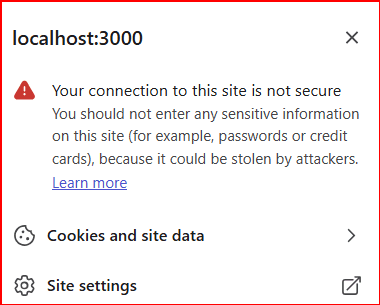
The drawing below is a different case from that panel. printer.local is a page name on a network, and when the browser is not offering a private connection there, the page can be read or changed on the way. It can still be an ordinary page, and it is not a padlock that is only one click away.
A full-page warning is a separate notice
Chrome help, linked earlier, also describes a warning that fills the page when a website has been marked unsafe, and it says that website can misuse what people send it and might try to place harmful software on the computer. That warning is a separate notice from the padlock. A website can have the private connection the padlock refers to and still be flagged. A padlock with no warning is not a review of the website, because the padlock refers to the connection and the warning refers to a flag.
The private connection can end at a middle computer
The private connection runs to the computer that presents the certificate for the website name, and that computer can be a middle computer the website uses, one that is allowed to open the page and pass it on. How that middle step works is the subject of the guide to proxies and load balancers. The padlock in the address bar still does not decide whether the website is safe. It describes the connection you can see from the browser to that named stop.
The padlock, stated plainly
- The padlock in the browser address bar is not enough by itself to decide that a website is safe.
- It means the connection to the named website is private from other people on the way. The website can still read what you send.
- A website can show a padlock and be unsafe, spammy, or fake. Read the website name beside the padlock, including a misspelling or a wrong ending.
- Browsers change, so the padlock may appear only after you open the security details. Not seeing it in the address bar is not, by itself, a sign that the connection is open.
- When a page is crossing a network and the browser shows there is no private connection, the page can be read or changed on the way. The same warning can appear for a page that never leaves your computer, where there is no such path. That does not mean the business is a fraud.
- The logo on the page is not the website name. The name in the address bar is the one tied to the padlock.
- The network can still see that a connection was opened, and it can often see the website name. A saved copy on the device, and a page that only exists on your own computer, are different questions from whether the website is safe.
- A full-page warning that a website was flagged is a separate notice. A padlock with no warning is not a review of the website.