How to Ping IndexNow Automatically After a Vercel Deploy, Using GitHub Actions
This is a how-to for a site that lives on Vercel and GitHub. If you use another host, read for the idea, then wire it your way. You should not paste IndexNow links by hand after every ship. When Vercel finishes a production deploy, GitHub Actions looks at what changed, picks those page links, and sends only those to IndexNow. That happens by itself. A preview deploy does not send anything. Change one page, one link goes out. Change a thousand pages in the same ship, about a thousand links go out together.
Published on

IndexNow is a push. When a page changes, your site tells search engines that use IndexNow the exact link. You do not wait for a bot to stumble onto it later. If you want what the ping is, who hears it, and how a small file on your site proves you own it, start with what IndexNow is. This post is the next step: make that ping happen by itself after the live site updates, and only for the pages that actually changed. Here, a ship means putting a new version of the site live.
This is the setup this site uses. The live site runs on Vercel. The code lives on GitHub. When Vercel finishes updating the live site (Vercel calls that Production, and it succeeded), GitHub starts a job. That job runs a small script we wrote. The script compares that version to the last live version, turns changed files into public page links, and sends only those links to IndexNow. A test copy of the site (a preview) does not ping. Shared code that is not a page does not ping. You do not paste a list. This does not run when someone opens a page, so it does not slow the site or affect Core Web Vitals (CWV).
Who this is for
These steps are for a site that goes live on Vercel from a GitHub code folder, the same way this one does. That pairing is what the job waits for: Vercel tells GitHub the live site just updated, and the job treats Production success as “the live site just updated.”
If your site is not on Vercel and GitHub, keep the idea and change the setup. The idea is: wait until the live site is actually updated, compare that version to the last live version, turn changed files into page links, then send those links to IndexNow. Do not copy this Vercel-and-GitHub job onto a site that never sends that “live site updated” message.
The problem a hand ping creates
Pasting links by hand fails in three boring ways. You forget. You paste yesterday’s link and miss today’s. Or you send every page on the site every time, including pages that did not change.
This site still has a separate button for a rare “send the whole site” ping or one hand-picked link. Everyday updates should not use it. After each live update, the GitHub job is the path. That is the whole point of automatic plus streaming: no paste, and no “send everything.”
Automatic vs. streaming, in plain words
Automatic means you do not paste links or submit them by hand/manually. Finishing a live-site update is what starts it. The job runs on GitHub’s computers, not in the visitor’s browser, and not on a clock that re-sends every page at dawn.
Streaming here means the list matches that update. Change one page, one link goes out. Change a thousand pages in the same update, about a thousand links go out together. IndexNow’s published limit is 10,000 links in one send; the script keeps the first 10,000 and drops the rest. A preview (a test copy) sends zero. An update that only touched shared pieces that are not a page also sends zero, on purpose.
When the job starts — and when it stays quiet
The job file waits for GitHub’s deployment_status message — that is GitHub’s “a deploy just reported in” note. It only starts the ping when that note says success and the label on the deploy is Production (or production). A Vercel preview uses a different label. The start rule says no. The job does not even download the code. No ping.
Everyday updates do not need a person. Vercel finishes the live site, GitHub starts the job. There is also a manual switch if you want to check the list yourself. GitHub’s built-in name for “run this job by hand” is workflow_dispatch. That name is GitHub’s, not this site’s. Any GitHub Actions job can turn it on. This IndexNow job has it on, so the Actions tab shows a Run workflow button on this job. A job that never added that switch would not show the button.
The Run workflow button itself is GitHub’s. Clicking it runs that job now. It does not wait for Vercel. That part is true of any GitHub job that turned the switch on.
What happens after you click is this IndexNow job’s rules, not GitHub’s default. GitHub lets each job add its own optional boxes. Other jobs may have different boxes, or none. This job added two:
- Dry-run (a practice run) — this site’s script prints the link list in the log and does not ping IndexNow. Turn this on when you are only checking.
- Previous version — this site’s script uses that older version to compare against. Leave it blank and the script picks the last live Production version on its own, same as the automatic path.
GitHub Actions: Run workflow panel
Swipe horizontally or scroll to the right to view the full screenshot.
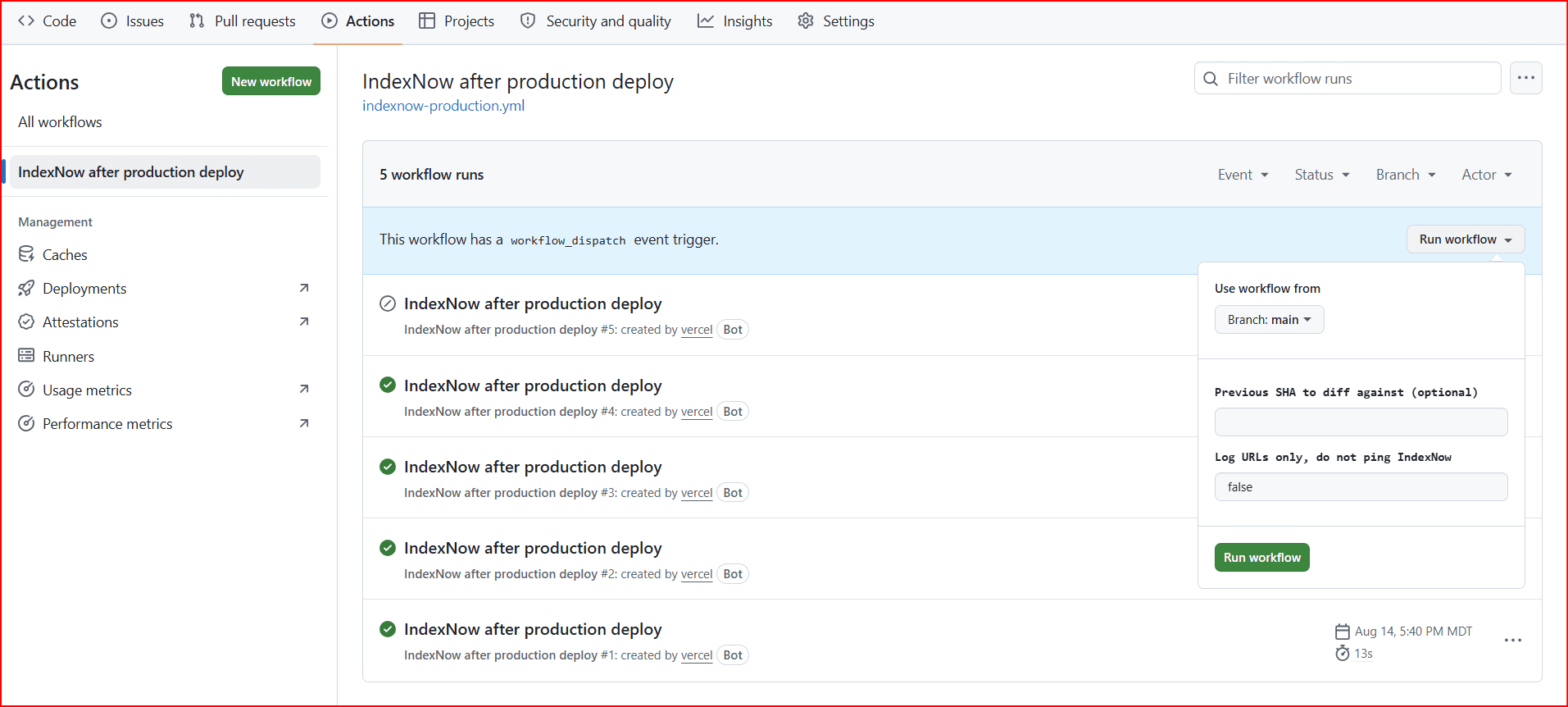
On this job, if you click Run workflow and leave dry-run off, the ping is real. This job’s start rule also lets the button run even if Vercel did not just finish a live-site update. That mix — practice run, optional older version, ping unless you say otherwise — is how this IndexNow job is written. It is a check tool here, not the everyday start.
When the job runs — automatic after a live update, or from the button — it downloads that version of the code, including older saves, so the script can compare against the last live version. Then it runs that script. It only needs permission to read the code and the list of deploys.
How it builds the list
On this site, the list is not “every page.” It is “public page links whose page files changed between the last live version and this one.” That mapping is this job’s script.
The last live update, not the last save
Comparing only to the previous save (HEAD^) is the wrong default. You might land several saves in one live update. The script asks GitHub for the previous live Production version that is not the current one, then compares the files that changed between those two labels. That is “what went live,” not “what the last save touched.”
HEAD^ is a git shortcut, not a password. HEAD means “the version we have right now.” The caret ^ means “the one right before that.” So HEAD^ is “the save right before this one,” not “the last time the live site updated.” If two saves went live in the same update, that shortcut would miss the first one.
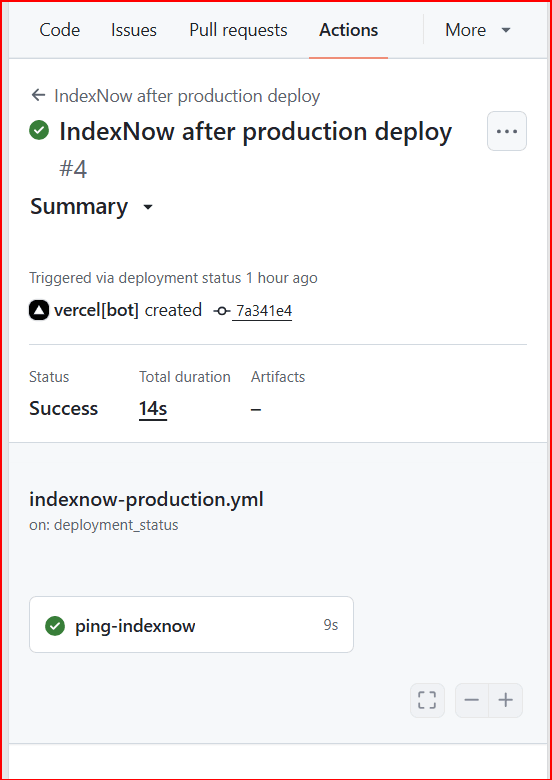
Those labels are often called a SHA (said “shah”). Think of it as a name tag for one version of the code: a long mix of numbers and letters, like the Diff line in the job log. GitHub also shows a short stub, like 7a341e4 on the Summary tab. It is not a password. It does not open the code folder. It just points at one version so the job can ask, “what files changed since the last live one?”
If GitHub has no previous live Production version (first time, or it cannot see deploys), it falls back to the save right before this one. If even that is missing, it logs that there is nothing to compare and stops without pinging. That skip is safer than inventing a huge list.
File to public URL — this site’s rules
How a changed file becomes a link is this site’s script, not a GitHub default and not IndexNow’s rulebook. Other sites can map files differently. Here, each changed file either becomes one public page link or is ignored. A page file lives in a folder; that folder path is the public link. For example, app/math/margin-vs-markup-calculator/page.tsx becomes /math/margin-vs-markup-calculator. A matching metadata.ts in that folder is the same link. Blog images under public/images/blog/{slug}/ ping that blog link — so dropping the screenshots for this post into its image folder will ping this post on the next live update. If you rename or move a page, this script adds both the old link and the new link, so IndexNow can hear about the link that went away and the link that appeared.
A real live update on this site is the worked example. The job log listed two links: the hedge funds vs. private equity post, and the Margin vs. Markup calculator. Two public pages showed up. Two links went out. The log line was Submitted 2 URLs. That is streaming, not “send every page.”
| What you changed in the code | What IndexNow gets |
|---|---|
A page file (page.tsx) or its metadata.ts | That page’s public link |
Images under public/images/blog/{slug}/ | That blog post’s link |
The site-wide layout file app/layout.tsx | The homepage only — not every child page |
| The layout file for a section, like the main blog page | That section’s main page only — not every page under it |
| Shared pieces, settings files, or server files that are not pages | Nothing. Those files are not a public page. |
| A Vercel preview (a test copy of the site) | Nothing. The job does not run. |
What never becomes a ping
The skip list is the honest part. Changing a header that appears on every page does not ping every page. Changing globals.css (the site-wide style file) does not ping anything. Changing a server file named route.ts does not ping anything. The little site icon, the job file, and anything outside app/ (except those blog image folders) are ignored. If a shared header changed but no page file did, IndexNow stays quiet. That is a real limit. Do not treat this job as “the whole site is re-announced whenever the header moves.”
What you actually add
Two files. You do not paste extra passwords into GitHub for daily use. The script is the one that does the thinking. The job file is the one that starts it.
The chain on this site, in order:
- Vercel finishes updating the live site and tells GitHub “Production succeeded.” That poke is Vercel’s GitHub connection. Our script does not talk to Vercel.
- The GitHub job file hears that message, starts only on live success, downloads that version of the code, and runs the script. On this code folder that file is
.github/workflows/indexnow-production.yml. - The script does the work: find the last live Production version, see which files changed, turn those files into public page links, send only that list to IndexNow. On this code folder that file is
scripts/ping-indexnow-from-diff.mjs. It sends tohttps://api.indexnow.org/indexnow— that address is IndexNow’s, not this site’s. What this script puts in the send is this site’s: this site’s name, this site’s already-published IndexNow key, and the address of that small proof file on this site.
So GitHub is the starter. Vercel is the “live site just updated” signal. The script is the worker that turns “a deploy happened” into “here are the pages that changed — ping those.”
Your live site already needs the IndexNow key file at https://your-host/{key}.txt so search engines can check you own the site. The script reads that same key from your existing IndexNow setup. Do not paste the key into this article, into a screenshot, or into a chat. The key file is meant to sit on the live site. Still do not copy it into places it does not belong.
Proof it ran: one live update, two links
Three original screenshots from one live Production update. Two public pages showed up. Two public links went out. GitHub shows the ping. Bing shows the same two links on the Submitted URLs list, both marked source Self.
GitHub Actions: ping-indexnow job log
Swipe horizontally or scroll to the right to view the full screenshot.
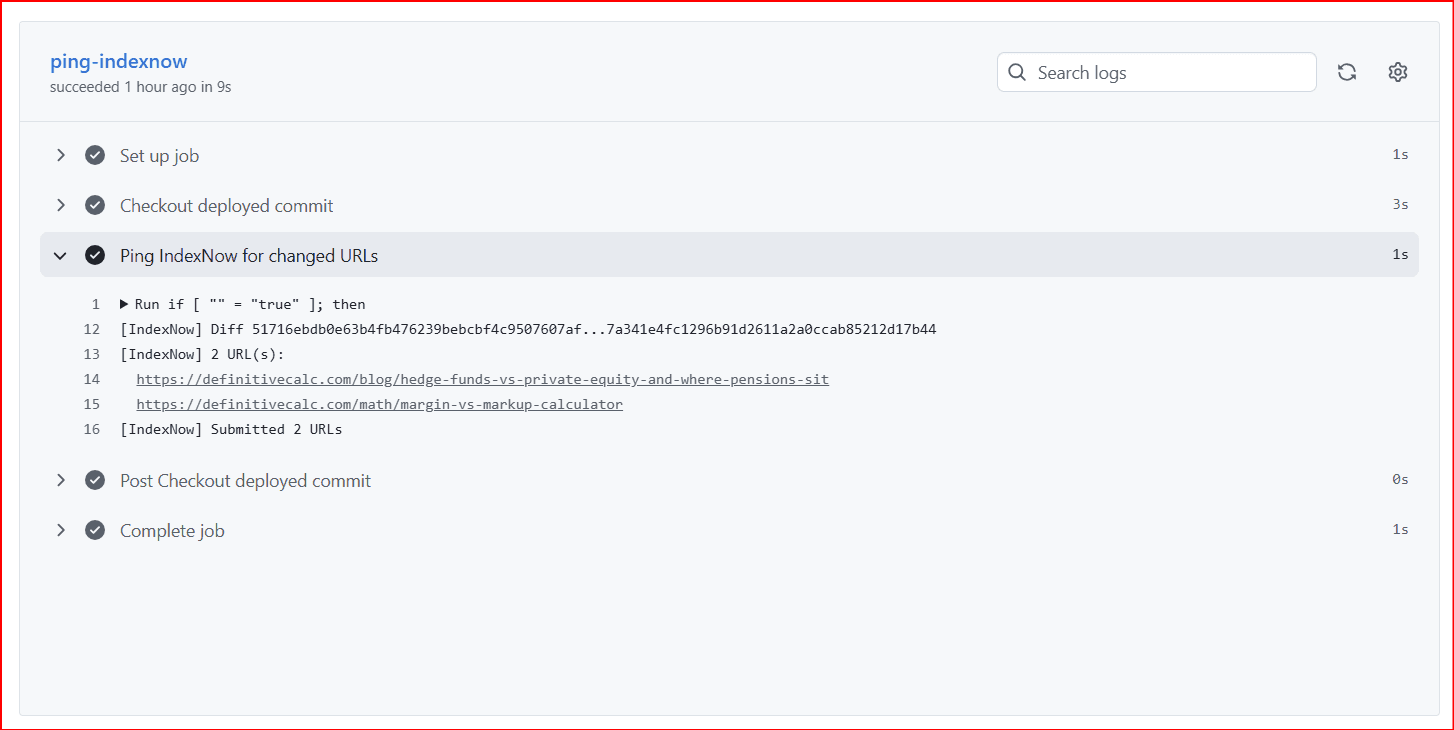
The expanded step is mostly English once you know the lines:
if [ "" = "true" ]is the practice-run check. Empty quotes mean dry-run was not turned on, so this run sent for real. If it had saidtrue, the job would only print links.[IndexNow] Diff …is the compare step. The two long strings are SHAs: last live Production version, then this update. The three dots mean “files that changed between these two.”2 URL(s):is the count the script built from those files. The next two lines are the public links.Submitted 2 URLsmeans IndexNow accepted that list.
GitHub Actions: run summary
Swipe horizontally or scroll to the right to view the full screenshot.
Bing Webmaster Tools: IndexNow submitted URLs
Swipe horizontally or scroll to the right to view the full screenshot.

When the log says there is nothing to ping
A successful live Production update can still print No indexable page URLs in this deploy; skipping ping. That is not a failure. It means the script looked at what changed and found no public page. Typical cases: you only changed a shared piece, a settings file, a server file that is not a page, or the little site icon. The job should finish cleanly. Do not “fix” that by sending every page on the site.
If you expected a link and did not see it, check the file path. The script only looks in app/ (minus app/api/) plus blog image folders. A typo in a folder name, or a change that lives only in components/ (shared pieces used by many pages), will not show up. Use the job’s dry-run (practice run) to print the link list without sending the ping.
Summary
After a Vercel Production update succeeds (the live site), Vercel tells GitHub. A GitHub job starts and runs this site’s script. The script compares that version to the last live version, turns changed page files into public links, and sends only that list to IndexNow. Preview copies do not run the job. Shared code that is not a page does not get pinged.
Automatic means you do not paste links or submit them by hand/manually. Streaming means the list matches that update: one page, one link; many pages in one update, many links together, up to IndexNow’s 10,000 limit. The script talks to IndexNow directly. It does not run in the visitor’s browser, so it does not affect Core Web Vitals (CWV).
If your site is not on Vercel and GitHub, keep that idea and change how you detect that the live site updated. Everyday updates should not be a hand-pasted list or “send every page.”