What's the Difference Between a Wi-Fi Extender, a Mesh Kit, and a Longer Ethernet Cable?
A Wi-Fi extender is an extra box that sends your current Wi-Fi farther. A mesh kit is several boxes that cover the house as one network. A longer Ethernet cable is a wire you run from the router. Here’s how they differ, and which to use when only one computer is too far versus when the whole house needs coverage.
Published on

A Wi-Fi extender, a mesh kit, and a longer Ethernet cable can all show up in the same shopping tab when the internet feels weak in part of the house, but they do different work. An extender takes the Wi-Fi you already have and sends a copy farther. A mesh kit is a set of boxes meant to cover the house as one network. A longer Ethernet cable is a wire from the router to a computer, or to another Wi-Fi box, so that stretch does not have to go through walls as radio.
You will see what each one changes, how to tell a single computer that is too far from a whole house that needs coverage, and how to try a cable before you buy another wireless box.
Check the Wi-Fi you already have
An extra box will not help if the laptop and the router already disagree, and it will not help if the internet plan is slower than you think. Before you shop, read how to tell what Wi-Fi you are on. That post shows the Protocol line in Windows, whether your router or mesh matches that generation, and how a real speed test compares to the generation the laptop reports.
The rest of this article assumes that check is done, Wi-Fi works next to the router or is clearly better there, and the weak spot is farther away. Extenders, mesh kits, and cables are for that kind of reach problem.
What a Wi-Fi extender does
It sends your current Wi-Fi farther
Plug an extender in a hallway or a room that still hears the router, and it picks up that Wi-Fi and sends it onward. Phones and laptops in the weaker area can then connect to the extender instead of trying to reach the router from the far side of the house. The name on the box is often “extender,” “repeater,” or “booster,” and those words describe the same job: copy the signal you already have and place that copy closer to you.
Why the extra box can still feel slow
A simple extender has to listen and then talk, so some of the air is used twice for the same trip. The computer in the weaker area often gets a slower copy than a computer next to the router. Dual-band extenders can use one band to talk to the router and another to talk to you, which usually hurts less, but you are still adding an extra wireless step.
That can be enough for email and light browsing in one corner. It is a weaker match for a desk you sit at all day, for video calls, or for a house where many rooms feel weak. If the router’s own Wi-Fi is already poor, the extender copies that same poor signal and sends it farther.
Swipe if needed — large labels stay readable on a phone.
What a mesh kit does
Several boxes, one network name
A mesh kit is sold as a small set: a main box that connects to your internet, plus one or more extra boxes you place in other rooms. Phones and laptops usually see one network name as you walk, instead of a main name and a second “_EXT” name. The extra boxes are meant to be part of the same system rather than a second copy of the first signal.
That shape of product fits when many rooms feel weak, not only one desk. Walls, floors, and neighbors still affect the radios, so a mesh label does not mean every room will feel as strong as the spot next to the main box.
How those boxes talk to each other
The extra boxes still have to reach the main box. If they do that over Wi-Fi, part of the air is spent on box-to-box talk. A cable between the boxes is better still. Many mesh boxes have an Ethernet port. If you can run a cable from the main box to a satellite, that satellite does not have to use Wi-Fi to stay connected to the main box, while phones in the room can still use Wi-Fi for the last few feet.
When you read “mesh” on a store page, look for that port, and check whether the kit expects you to place the extra boxes where they can still hear the main one. A satellite in a basement that cannot hear the main box will not add coverage until it has a path back, which is often the cable.
How a mesh kit differs from an extender
Here is the extender setup. You keep the router you already have. You buy one extra box and plug it in closer to the weak room, in a place that can still hear the router. That extra box copies the router’s Wi-Fi and sends it into the weak room. The phone in that room connects to the extra box. You may see two Wi-Fi names: the router’s name, and a second name for the extender.
Here is the mesh setup. You buy a kit of two or more boxes made to work together. One box is the main box. That main box still needs your home internet: you plug it into the modem or the ISP fiber box, the way you would plug in a router. The kit does not create a new internet plan. It becomes the house Wi-Fi in place of the old router. You place the other boxes in other rooms. Those extra boxes talk to the main box from the same kit. The phone usually shows one Wi-Fi name in every room, including when you walk down the hall.
The name difference matters when you walk. With an extender, the far room is often a second Wi-Fi name. The phone may keep the router’s name even after you enter that room, so you are still on the weak signal, or you open the Wi-Fi list and pick the extender’s name yourself. With a mesh kit, the extra boxes usually share the main box’s name, so the phone can use the nearer box without you joining a second network.
Speed is a second difference, and it is easy to overstate. A simple extender often uses the same Wi-Fi both to hear the router and to talk to you, so some of the air is spent twice, and the far room is slower than the spot next to the router. A mesh kit is built for several boxes to share the house. Some kits give those boxes a separate wireless path just for talking to each other, and a cable between boxes is the surest version of that path. If an extra mesh box has no cable and no separate wireless path, it has to use the same Wi-Fi the phones use to reach the main box. That box-to-box talk still uses some of the Wi-Fi, so the far room can still be slower.
| Question | Extender | Mesh kit |
|---|---|---|
| Do you keep your current router? | Yes. You add one extra box to it. | Usually no. The main box becomes the router and still plugs into your home internet. |
| What does the extra box do? | It copies the router’s Wi-Fi farther. | It works with the main box from the same kit. |
| What does the phone show? | Often two Wi-Fi names. | Usually one Wi-Fi name as you walk. |
| What happens when you walk to another room? | The phone may stay on the weak name, or you pick the extender name yourself. | The phone can use the nearer box under the same name. |
| Why can it feel slower? | The extra box often uses the same Wi-Fi twice, to the router and to you. | Extra boxes still need a path to the main box. A cable is the strong path. |
| What is it for? | One weak spot. | Several rooms, as one network. |
Swipe if needed — large labels stay readable on a phone.
What a longer Ethernet cable does
A wire to the computer
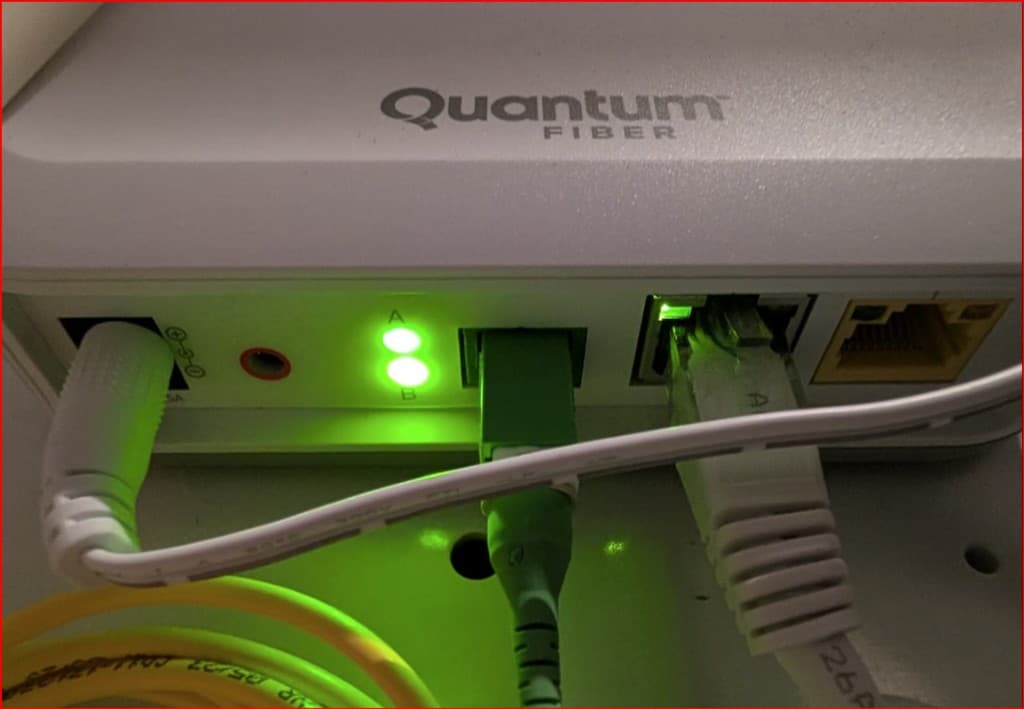
Ethernet is the rectangular jack. On many Wi-Fi routers it sits in a row labeled LAN. An ISP fiber box uses the same kind of jack for a house cable. The fiber from the provider is a different plug, so the Ethernet cable does not go in there. A cable from one of those jacks to a laptop, desktop, or a USB adapter on a laptop is a separate path that does not share the air with the TV, the phone, and the doorbell camera. For one desk that is too far from the Wi-Fi, that cable is often enough, because the computer uses the wire for that stretch instead of Wi-Fi.
You do not need a special “gaming” cable for a house. The patch cord that shipped with many routers is often Cat5e or Cat6, which is enough for gigabit at home, and indoor runs are almost always shorter than the usual 100-meter limit for that kind of cable. You can hide it along a baseboard later. The first test can sit on the floor for an afternoon. The photo below is one example of those rectangular jacks.
Quantum Fiber Box: Ethernet Ports
Swipe horizontally or scroll to the right to view the full image.
A wire to a second Wi-Fi box
If you cannot park the computer on a cable, you can still run Ethernet to a second access point or to a mesh satellite in that part of the house so phones can stay on Wi-Fi. The long trip through walls is the part that usually fails, and a cable can take that trip. The box at the far end can be a mesh extra box or a simple extra Wi-Fi box. Once the long trip is on the cable, those two setups can feel about the same, because both are only using Wi-Fi for the last few feet.
What Windows should show when the cable is working
On Windows 11, open Settings → Network & internet → Ethernet, open the connection, then open Hardware properties. Look for Link speed (sometimes shown as receive and transmit rates). 1.0 Gbps means that path can move a gigabit. 100 Mbps often means a cheap USB adapter, an old 10/100 port, a damaged cable, or a port that is not a gigabit Ethernet jack. A 100 Mbps wire can lose to decent Wi-Fi next to the router, so read that number before you decide the cable is slower.
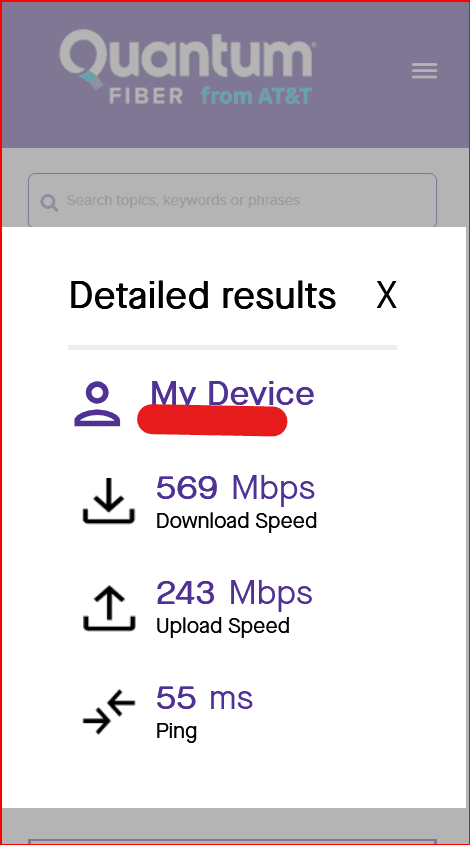
Plug in at the desk that was weak, run the same speed test on Ethernet and on Wi-Fi in that room, and keep the rest of the house the same. If the wire is clearly better, the weak spot was the wireless path. If the monthly bill never lists Mbps, a speed test is the record you have. The screenshot below is one of those tests, run on Wi-Fi.
Quantum Fiber Speed Test: Detailed Results
Swipe horizontally or scroll to the right to view the full screenshot.
Swipe if needed — large labels stay readable on a phone.
One computer that is too far vs. a whole house that needs coverage
The shopping choice is easier if you name what you are trying to fix. One desk that cannot hear the router is a single-path problem. A phone that drops in the bedroom, the kitchen, and the basement is a whole-house problem. An extender adds a little extra reach, a mesh kit is built for several rooms sharing one name, and a cable is for a path you can actually run.
| What you are trying to do | Better first try | Why |
|---|---|---|
| One desk is too far, and you can run a cable | Ethernet to that computer | The computer uses the cable for that stretch. The router and the internet plan stay the same. |
| One area is too far, but people walk around with phones | Ethernet to a second Wi-Fi box in that area | The long trip is on the wire, and phones in that area can still use Wi-Fi. |
| Many rooms feel weak | A mesh kit, with cables between boxes where you can | One hallway extender rarely covers a whole house well. |
| You need something this afternoon for one corner | A simple extender for a short-term extra | It copies the Wi-Fi you already have, so treat it as temporary if that desk matters all day. |
How to try a cable before you buy another box
A simple cable test
Borrow or buy an Ethernet cable long enough to reach the desk that was weak, even if it lies across the floor for one afternoon. Plug one end into an empty Ethernet jack on the router or on the ISP fiber box, and the other into the computer or a USB Ethernet adapter. In Windows, confirm the Ethernet connection is the one in use, then run the same speed test you use on Wi-Fi. If the wire is clearly better, the weak spot was the wireless path. You can then hide the cable or run it through a closet. If phones still need Wi-Fi in that room, you can unplug the computer and plug the same wire into an extra Wi-Fi box there, such as a mesh extra box or a simple access point. You do not have to leave the test cable lying across the floor.
If a cable to the desk is not realistic
Renters, stairs, and brick walls can make a desk cable hard. You can still run a shorter Ethernet cable to a nearer room and place an extra Wi-Fi box there, such as a mesh extra box or a simple access point.
Some homes use a different workaround: two small adapters that plug into wall outlets, often sold as powerline adapters. One sits near the router, on a short Ethernet cable. The other sits in the weak room and gives you a network jack there. The adapters send the internet through the house electrical wires, not through an Ethernet cable you ran. That can work, but it depends on the wiring in that house, and it can change when other appliances are on. It is not as steady as an Ethernet cable. If you try it, run the same speed test in the weak room on that outlet path and on Wi-Fi, then compare those two results the same way you would compare a cable to Wi-Fi.
What none of these three will fix
A longer cable cannot raise your internet plan. An extender cannot turn an old laptop radio into a new one. Mesh will not make a computer faster at exporting video or compiling if the machine itself is the wait. If the path is already fine next to the router and the computer still freezes on local work, count those minutes with measure lag before you upgrade, then put the leftover daily wait into the Is a Faster Computer Worth It? calculator. Extenders, mesh kits, and cables are for coverage, not for a faster computer.
A simple way to choose
Start by naming what you are trying to fix. If only one computer is too far and a cable can reach it, use the cable. If people need Wi-Fi in that part of the house, run the cable to a second box there. If many rooms are weak, look at a mesh kit and use wires between boxes where you can. Keep an extender for a small, temporary corner, knowing it is still copying the Wi-Fi you already have.
After you pick, give the new layout a few ordinary days, then decide from how calls, pages, and files feel in the rooms that were weak, not from the Wi-Fi version printed on the package.
Summary
- A Wi-Fi extender is an extra box that sends your current Wi-Fi farther. It copies what the router already said, and a simple one spends some of the air listening and then talking.
- A mesh kit is a set of boxes that run the house as one Wi-Fi name. The main box still plugs into your home internet and acts as the router, and the extra boxes work with that main box. The extra boxes still need a path home. A cable between them is the strong version of that path.
- A longer Ethernet cable is a wire from an Ethernet jack on the router or ISP fiber box to a computer, or to a second Wi-Fi box. Check Windows Ethernet → Hardware properties → Link speed. 1.0 Gbps means the cable path can move a gigabit. 100 Mbps often means the adapter or the port.
- If only one computer is too far and you can run a wire, start with Ethernet. If the whole house needs coverage, look at a mesh kit and use cables between boxes where you can. An extender is a small, temporary extra for one corner.
- None of the three raises your internet plan or replaces a slow computer. Confirm the Wi-Fi you already have first, then shop for coverage.